EIE3320 Homework 1–5 精读
课程:EIE3320 Object-Oriented Programming(2026/27 S1, Lecturer: Richard Pang) 素材:
EIE3320 HW 1..5(Canvas 原件)+BlueJProjects.zip/dome-v1.zip/dome-v2.zip内的真实源码 定位:这份文件是作业侧的逐题拆解,回答「这题到底要什么、卡在哪、对应课件哪一页、怎么自查」。 配套文件:eie3320 课件精读(ch11 / ch14 课件逐页精读)。两文内容重叠但各自独立可读。
0. 这份文件怎么用
| 你想干的事 | 看哪一节 |
|---|---|
| 快速确认某份作业几点截止、交什么 | §1 总览表 + 提交规范 |
| 卡在某道题上,想知道题目真正的判定标准 | 找到该题末尾的「本题结论」 |
| 想让自己的 Week 1–4 笔记补全某一节 | 每题的「对应课件」直接给出章节页码 |
| 交之前逐项对照判分点 | 「本题结论」里的判分点 + 该题的易错点 |
已经存在的一手笔记,本文只做索引、不重复抄写:
- EIE3320 Week 1(Ch1 + Ch2-7:编译、语法、选择、循环、方法、数组、
ArrayList) - EIE3320 Week 2(Ch8:object/class、constructor、static、可见性、传对象)
- EIE3320 Week 3(Ch10:immutable、scope、
this、抽象与封装、设计准则) - EIE3320 Week 4(Ch9:String、Character、StringBuilder、命令行参数、File/I-O、异常)
Ch11(继承与多态)与 Ch14(抽象类与接口)尚无课堂笔记,因此这两章的逐页精读放在 eie3320 课件精读;本文 HW4/HW5 的「对应课件」全部指向那一份的页码。Ch9 的逐页精读另有一份:eie3320 ch09 walkthrough(HW5 的正则部分在它 p.26–30)。
1. 五份作业总览
1.1 一览表
| HW | 标题 | 主题 | 对应课件 | 概念落在哪份笔记 | 必做 | 权重 |
|---|---|---|---|---|---|---|
| HW1 | Java Programming Basic | 控制台输入、循环、方法、switch、% | Ch1 + Ch2–7 | Week 1 | 1 题 | 1% |
| HW2 | OOP (Object Interaction) | 两个对象协作、改显示逻辑、构造器、Rectangle | Ch8(+Objects First ch03 clock-display) | Week 2 | 1 题 | 1% |
| HW3 | OOP (Grouping Objects) | 对象数组、toString()、print() 委派 | Ch8 + Ch10 | Week 2 / Week 3 | 1 题 | 1% |
| HW4 | OOP (Inheritance) | 抽出父类 Item、super、方法覆盖、Iterator | Ch11(+Ch14 的 List/ArrayList) | 新增(见课件精读) | 2 题 | 1% |
| HW5 | OOP (Polymorphism) | 父类型引用、动态绑定、Pattern/Matcher | Ch11 + Ch9(正则 p.26–30) | 新增 + Week 4 | 1 题 | 1% |
时间线(来自 EIE3320_schedule_20260904.pdf):HW1 第 2 周、HW2 第 4 周、HW3 第 5 周、HW4 第 6 周、HW5 第 7 周,每周日 23:59 截止。晚交每天扣 20%。
1.2 提交规范(五份通用,且扣分项)
| 要求 | 原文依据 | 备注 |
|---|---|---|
压缩整个工程文件夹为 .zip / .7z | HW1–HW5 开头的 Important/Submit 段 | 必须含 .java 源码;缺源码不给分 |
每个 .java 文件第 1 行起写题目号、姓名、学号、工具 | HW2–HW5 的开头段(HW1 只要求姓名+学号) | 示例见下 |
| 每题一个新 class / 新 project | 五份都有 | 不要把 5 道题塞在一个项目里 |
HW2 之后要求的文件头格式(逐字照抄课件示例):
// HW4. Q1.
// Chan Tai Man 1234567d
// Tool: BlueJ
HW1 的写法则只要求 //Chan Tai Man 123456d,外加「若使用 BlueJ 以外的工具,请加一行注释说明」。
1.3 五份作业其实是一条主线
把 HW1→HW5 连起来看,课程在训练同一个动作:把「一堆重复的字段和方法」逐步收敛成「一个父类型 + 若干子类型 + 一次多态调用」。
| 阶段 | HW | 代码形态 | 你被迫做的判断 |
|---|---|---|---|
| 1 纯过程 | HW1 | 一个 main,循环 + 方法 | 循环边界、%、switch 分组 |
| 2 对象协作 | HW2 | ClockDisplay 持有两个 NumberDisplay | 谁该改状态、谁只负责显示 |
| 3 对象聚合 | HW3 | UniversityStudent 持有 Course[] | 容量 vs 实际条数、toString 委派 |
| 4 抽父类 | HW4 | Item ← CD/Video/VideoGame | 哪些字段上移、super() 放第一行 |
| 5 用父类型 | HW5 | Item 引用 + instanceof + 正则 | 声明类型 vs 实际类型、向下转型 |
第 4 步和第 5 步是本校这门课整学期最常考的两个动作,HW4 Q2 和 HW5 Q1 值得反复重写到不看答案能默写。
2. HW1 · Java Programming Basic
2.0 HW1 结构
| 序 | 题目 | 必做 | 训练点 | 对应课件 |
|---|---|---|---|---|
| Q1 | 数字金字塔 | ✅ | 双层 for、格式化输出、居中 | Ch2–7 p.20–25 |
| Q2 | 秒 → 时/分/秒 | / 与 % | Ch2–7 p.4–5、p.8 | |
| Q3 | 前 100 个三角数 | 写方法、每行 10 个 | Ch2–7 p.26–33、p.20–22 | |
| Q4 | 某月天数 | switch 分组穿透 | Ch2–7 p.19 | |
| Q5 | 糖果包装纸 | 循环不变式、终止条件 | Ch2–7 p.23–25 |
下面逐题拆。Q1 给完整参考实现,其余给关键片段——因为真正的难点在「想清楚」而不在「敲出来」。
2.1 Q1(Compulsory)· 数字金字塔
原文(EN)
| 原文 | 中文 |
|---|---|
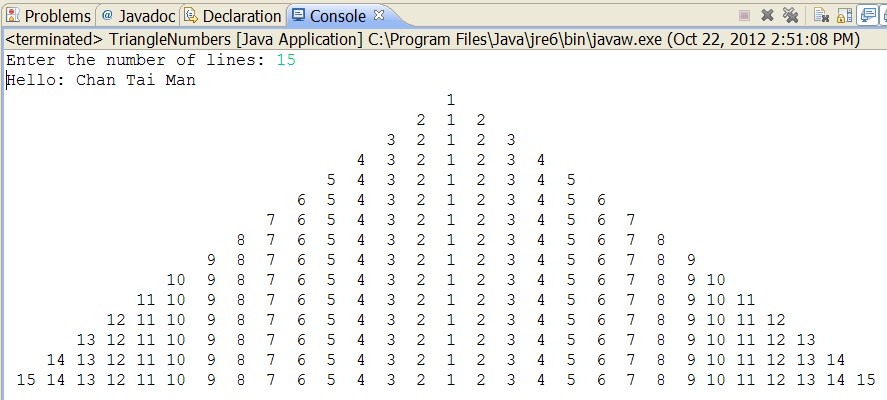
| (Compulsory) Use the statement for to write a program that prompts the user to enter an integer from 1 to 15, and displays a pyramid as shown in the following sample run (the input is 15): | (必做)用 for 语句写一个程序,提示用户输入 1 到 15 的一个整数,并显示如下样例运行所示的金字塔(输入为 15): |
原图
讲解
样例输出有三个容易被忽略的信息,它们决定了这题不是「打印 1..n 的三角形」:
- 提示语是
Enter the number of lines:,不是原文说的 “enter an integer from 1 to 15”。判分看输出是否与样例一致,所以照抄样例的提示语。 - 每一行是回文(palindromic)结构:第 k 行的数字序列是
k, k-1, …, 2, 1, 2, …, k,长度2k-1。第 15 行以15 14 13 … 1 … 13 14 15结束,而不是1 2 3 … 15。 - 右对齐成方块:所有行的数字对齐在固定列上,靠「前面补若干个 4 字符宽的空组」实现,所以第 1 行的
1正好落在整块的正中列。
算法(三层,都可写成 for):
for 行 i = 1..n:
    打印 (n - i) 组 4 空格            // 左缩进,让 1 列对齐
    for k = i down to 1:  打印 %4d k  // 左半支,含中心的 1
    for k = 2 to i:       打印 %4d k  // 右半支
    换行
参考实现
import java.util.Scanner;

public class Pyramid {
    public static void main(String[] args) {
        Scanner input = new Scanner(System.in);
        System.out.print("Enter the number of lines: ");
        int n = input.nextInt();

        System.out.println("Hello: Chan Tai Man");   // 样例里有这一行

        for (int i = 1; i <= n; i++) {
            // 1) 左缩进:每少一行就少一组 4 空格
            for (int s = 1; s <= n - i; s++) {
                System.out.print("    ");
            }
            // 2) 左半支 + 中心:i, i-1, ..., 1
            for (int k = i; k >= 1; k--) {
                System.out.printf("%4d", k);
            }
            // 3) 右半支:2, 3, ..., i
            for (int k = 2; k <= i; k++) {
                System.out.printf("%4d", k);
            }
            System.out.println();
        }
    }
}
为什么用 %4d 而不是 %3d:最大数 15 占 2 位,再留 2 个空格,正好对应样例里数字之间的间距;换成 %3d 整块会变窄但仍对齐,只要所有行用同一个宽度就不会错。真正会错的是「缩进用空格、数字用 %4d」这种宽度不一致的混搭。
对应课件
- Ch2–7 p.23–25:
while/do-while/for的流程图与语法——本页只需要for的三段式。 - Ch2–7 p.20–22:
printf与%d等格式说明符——%4d的宽度位就在这一页。 - Ch2–7 p.4–5:
Scanner读入整数。 - 已整理进 EIE3320 Week 1 的「Loop statements」与「printf statements」两节。
勘误 / 补充:课件样例输出里那行 Hello: Chan Tai Man 并非题目正文要求,是样例程序自己打印的问候(用来验证学生改过代码)。保留或删除都不影响判分,但正文只考金字塔本身。
本题结论
- 判分点:提示语逐字一致、行数正确、每行是
k..1..k的回文、整体右对齐。 - 最容易错的地方不是循环,而是把回文写成了 1..k 的递增三角形。
- 边界:
n = 1时只输出一行1,缩进循环一次都不进——n - i = 0时for自然跳过,不需要特判。
2.2 Q2(Optional)· 秒数换算成时/分/秒
原文(EN)
| 原文 | 中文 |
|---|---|
| (Optional) Write a Java program that prompts the user to enter time in seconds (e.g., 1000000) and displays the equivalent number of hours and remaining minutes and seconds (Hints: you may need to use the remainder operator ”%” in Java). Here is a sample run: | (选做)写一个 Java 程序,提示用户输入以秒计的时间(例如 1000000),并显示等价的小时数、剩余分钟数与秒数(提示:你可能需要用到 Java 的取余运算符 %)。样例运行如下: |
| Enter the number of seconds: 1000000 | 请输入秒数:1000000 |
| 1000000 seconds is 277 hours, 46 minutes, and 40 seconds. | 1000000 秒等于 277 小时 46 分 40 秒。 |
讲解
1000000 / 3600 = 277(整除,int 自动截断),余 1000000 % 3600 = 2800;2800 / 60 = 46,2800 % 60 = 40。三个量必须从同一个余数链上取,否则会出现「小时蹭了分钟的数」。
int total = input.nextInt();
int hours   = total / 3600;
int minutes = (total % 3600) / 60;
int seconds = total % 60;
System.out.println(total + " seconds is " + hours + " hours, "
        + minutes + " minutes, and " + seconds + " seconds.");
易错点
- 用
double存秒数再做除法会得到277.777…,输出与样例不符——全程int。 - 先算
minutes = total / 60 % 60也对,但seconds必须用total % 60,不要用minutes % 60。
对应课件:Ch2–7 p.6–7(语法与算术运算),EIE3320 Week 1「Programming Syntax」。
本题结论:/ 取商、% 取余,两者配对使用;这题是整个 HW1 里唯一纯算术、可以当热身。
2.3 Q3(Optional)· 前 100 个三角数
原文(EN)
| 原文 | 中文 |
|---|---|
| (Optional) A triangular number is defined as 1+2+3+… + n for n = 1, 2, and so on. Accordingly, the first few triangular numbers are 1, 3, 6, 10, …. Write a method that returns a triangular number. The header of the method is as follows: | (选做)三角数定义为 1+2+3+…+n(n = 1, 2, …)。因此前几个三角数是 1, 3, 6, 10, …。写一个返回三角数的方法,方法头如下: |
| public static int getTriangularNumber(int n) | 同上(方法签名) |
| Write a test program that displays the first 100 triangular numbers with 10 numbers on each line. Here is a sample run: | 写一个测试程序,显示前 100 个三角数,每行 10 个。样例运行如下: |
| The first 100 triangular numbers are: | 前 100 个三角数是: |
| Hints: Use for-loop and the remainder operator ”%”. | 提示:使用 for 循环与取余运算符 %。 |
讲解
两种写法,都要会:
// 写法 A:闭式公式 O(1)
public static int getTriangularNumber(int n) {
    return n * (n + 1) / 2;
}

// 写法 B:累加(课件提示的 for 写法)
public static int getTriangularNumber(int n) {
    int sum = 0;
    for (int i = 1; i <= n; i++) sum += i;
    return sum;
}
n(n+1)/2 在 n 为偶数时先除后乘、为奇数时先乘后除才能避免整除误差;这里 n(n+1) 恒为偶数,所以先乘后除永远安全。
输出部分的关键是「每 10 个换行」,用取余判断:
for (int i = 1; i <= 100; i++) {
    System.out.printf("%7d", getTriangularNumber(i));
    if (i % 10 == 0) System.out.println();
}
样例里最后一列是 5050,%7d 是因为最大 5050 占 4 位、再加间隔;只要一列宽度统一即可。
勘误:原文 1+2+3+ + n 中间那个省略号在原文档里是特殊字符,纯文本提取后丢掉了,实际应为 1+2+3+…+n。
对应课件:Ch2–7 p.26–33(方法的定义/签名/返回类型)、p.20–22(printf 列对齐),EIE3320 Week 1「Methods」「Overloading Methods」。
本题结论:这题真正的考点是「方法要能被复用」——getTriangularNumber 必须是独立方法而不是塞在循环里;另外 i % 10 == 0 是「每 n 个换行」的通用写法,后面 Lab 与 Test 都会再用。
2.4 Q4(Optional)· 某月有多少天
原文(EN)
| 原文 | 中文 |
|---|---|
| (Optional) Write a method that returns the number of days in a given month. The method header is as follows: | (选做)写一个返回给定月份天数的方,法头如下:(原文此处断行) |
| public static int daysInMonth(int month) | 同上(方法签名) |
| Let 1 represents Jan and 2 represents Feb and so on, and ignore leap years. Write a test program that prompts the user to enter a month as an integer and displays the number of days in that month. | 令 1 表示一月、2 表示二月,依此类推,忽略闰年。写一个测试程序,提示用户输入月份整数,并显示该月天数。 |
| Enter a month (January = 1): 7 July has 31 days. | 输入月份(一月 = 1):7 → 七月有 31 天。 |
| Hints: Use switch-case statements. | 提示:使用 switch-case 语句。 |
讲解
这题考的是 switch 的「故意穿透」(fall-through):把天数相同的月份堆在同一个 case 标签下,只在最后一个标签后写语句和 break。
public static int daysInMonth(int month) {
    switch (month) {
        case 1: case 3: case 5: case 7:
        case 8: case 10: case 12:
            return 31;
        case 4: case 6: case 9: case 11:
            return 30;
        case 2:
            return 28;              // 忽略闰年
        default:
            return -1;              // 非法月份
    }
}
输出那行 July has 31 days. 需要把数字月份翻成英文月名,最省事的是数组:
String[] names = {"January","February","March","April","May","June",
                  "July","August","September","October","November","December"};
System.out.println(names[month - 1] + " has " + daysInMonth(month) + " days.");
易错点
- 忘记
default:用户输 13 时方法要能给出非法信号,否则返回 0 会误导。 - 用
if硬写 12 个分支虽然能过,但题目点名要switch,且switch的分组写法是后面 KCQ/Test 的高频选择题考点。 July的数组下标是month - 1,不是month。
对应课件:Ch2–7 p.19(switch Statement Rules,含 break 与穿透),EIE3320 Week 1「switch statement rules」。
本题结论:switch 里「多个 case 共享一段语句」是合法且推荐的写法;这题是 Week 1 笔记里那张 switch 语法图的唯一实战。
2.5 Q5(Optional)· 糖果包装纸
原文(EN)
| 原文 | 中文 |
|---|---|
| (Optional) You may not believe but the following is a question of an Admission Test of a primary school in Hong Kong: You buy ten candies from a candy shop. If you return two sweet wrappers, you get one candy free. If so, how many candies can you get? | (选做)你可能不信,但下面是一道香港小学入学试题:你从糖果店买十颗糖。如果退回两张糖纸,可以免费换一颗糖。那么你一共能吃到几颗糖? |
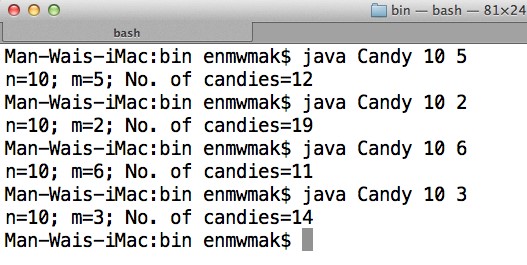
| Please write a Java program to help these poor kids to answer this question. To generalize the solution, your program should be able to accept different values of n and m as input, where n = 10 and m = 2 in this question. To avoid infinite number of answers, you may assume that each candy has exactly one foil and it is not allowed to cut the foils. Here are some example outputs of the program. | 请写一个 Java 程序帮帮这些可怜的孩子。为了一般化,程序应能接受不同的 n 与 m 作为输入,本题中 n = 10、m = 2。为避免无穷多答案,可假设每颗糖恰好有一张糖纸且不允许剪开糖纸。程序的样例输出如下。 |
原图
讲解
样例给出的四组结果,先把它们当成验证表:
| n | m | 总糖数 |
|---|---|---|
| 10 | 5 | 12 |
| 10 | 2 | 19 |
| 10 | 6 | 11 |
| 10 | 3 | 14 |
关键是一次兑换的净效果:交出 m 张糖纸,换回 1 颗糖,而吃掉这颗糖又产生 1 张糖纸。所以每兑换一次,手上的糖纸净减少 m - 1 张,糖数 +1。
int candies = n;
int wrappers = n;                 // 吃完买来的 n 颗,得到 n 张糖纸
while (wrappers >= m) {
    wrappers -= m;                // 交出去
    candies++;                    // 换到一颗
    wrappers++;                   // 吃掉后又得一张
}
System.out.println("n=" + n + "; m=" + m + "; No. of candies=" + candies);
验证 n=10, m=2:糖纸 10 → 9 → 8 … → 1,共兑换 9 次,糖数 19。✓
闭式答案(想明白就一次算完,不用循环):candies = n + (n - 1) / (m - 1)。代入 n=10, m=5 得 10 + 9/4 = 12 ✓;m=6 得 10 + 9/5 = 11 ✓;m=3 得 10 + 9/2 = 14 ✓;m=2 得 10 + 9 = 19 ✓。
参数怎么进来:样例图里运行的是 java Candy 10 5,说明它读的是命令行参数(args[0]、args[1] + Integer.parseInt),而不是 Scanner。这两种都符合题意,但如果你照抄样例的运行方式,就要用 args:
public static void main(String[] args) {
    int n = Integer.parseInt(args[0]);
    int m = Integer.parseInt(args[1]);
    ...
}
易错点
- 忘记「吃完又得一张糖纸」,写成
wrappers -= m之后不加回来 →m=2时会得 15 而不是 19。 - 循环条件写成
wrappers > m→ 糖纸刚好等于m时漏掉最后一次兑换(n=10,m=5会得 11,少 1)。 m = 1时m - 1 = 0,闭式公式除零;循环写法则会正确进入「1 张换 1 张」的无限循环——这正是题目那句「to avoid infinite number of answers」在提醒的边界。要额外挡一下m <= 1。
对应课件:Ch2–7 p.23–25(循环),Ch9 p.53(Command-Line Parameters,args 的用法),EIE3320 Week 1「Loop statements」。
本题结论:这是一道「先把不变量写清楚,循环就自然浮出来」的题。写之前先用题面给的 4 组数据验一遍手算,再写代码,比写完了再调快得多。
3. HW2 · OOP (Object Interaction)
3.0 HW2 结构
| 序 | 题目 | 必做 | 训练点 | 对应课件 |
|---|---|---|---|---|
| Q1a | BlueJ / 非 BlueJ 用户的环境准备 | 前置 | 打开 clock-display、编译、看 inspector | 无对应章(BlueJ Getting Started) |
| Q1b | 24 小时制 → 12 小时制 | ✅ | 只改「显示」,不动「计时」 | Ch8 p.20–31(对象状态与访问) |
| Q2 | Rectangle 类 | 字段默认值、两个构造器、getter 计算 | Ch8 p.10–19 | |
| Q3 | mail-system 对象协作 | 三个对象互相持有引用 | Ch8 p.20–21 | |
| Q4 | 调试器 | 断点、Step into、看局部变量 | 无 |
这一份和前一份的差别:HW2 只给一个必做题,但它给的不是「写代码」而是「改一段别人的代码」,而且明确要求 不要改 main()。这类题在校内作业里只出现这一次,却最能暴露「有没有真的读懂对象之间的消息流」。
3.1 Q1b(Compulsory)· 把时钟改成 12 小时制
原文(EN)
| 原文 | 中文 |
|---|---|
| (Compulsory) Change the clock. | (必做)改造这个时钟。 |
| Invoking BlueJ and open the project “clock-display” in Chapter 3 by clicking “Project” > “Open Project” and select proper folder (i.e. clock-display folder) containing the source code. Alternatively, you can open the project directly from File Explorer by double clicking the package.bluej file. | 启动 BlueJ,通过 “Project” > “Open Project” 打开第 3 章的 “clock-display” 项目并选中包含源码的 clock-display 文件夹。或者直接在资源管理器里双击 package.bluej 打开。 |
| Compile all classes. | 编译所有类。 |
| Optional: Create a ClockDisplay object, and then open an inspector window for this object. With the inspector window open, call the object’s methods. Watch the displayString field in the inspector. | 可选:创建一个 ClockDisplay 对象并打开它的 inspector 窗口。在 inspector 开着的情况下调用对象方法,观察 displayString 字段的变化。 |
| b. Change the clock from a 24-hour clock to a 12-hour clock. In a 12-hour clock, 01:30 is shown as 1:30 a.m. and 21:30 is shown as 9:30 p.m. Thus the minute display shows values from 0 to 59, while the hour display shows values from 1 to 12. Please note due to the main program given, your final output will display the result after adding one second in 12-hour format. Please refer to computer clock or watch on how to display 12-hour clock. | b. 把 24 小时制时钟改成 12 小时制。12 小时制下,01:30 显示为 1:30 a.m.,21:30 显示为 9:30 p.m.。因此分钟显示为 0–59,小时显示为 1–12。注意:由于 main 已给定,你的最终输出是「加一次之后」的 12 小时制结果。12 小时制的显示方式请参考电脑时钟或手表。 |
| Hints: There are two ways to make a 12-hour clock. One possibility is to store hour values from 1 to 12. On the other hand, you can leave the clock to work internally as a 24-hour clock, but change the display string of the clock display to show 04:23 p.m. when the internal value is 16:23. | 提示:有两种做法。一种是直接把小时存成 1–12;另一种是内部仍按 24 小时跑,只在生成显示串时把内部 16:23 显示成 04:23 p.m.。 |
| Since the clock only has two digits, one tick of this clock will result in the next change of the display. In this question, it will be: | 由于这个时钟只有两位数字,一次 tick 就会让显示走到下一个值。本题中即: |
| 00:00 → 12:01 a.m. | 00:00 → 12:01 a.m. |
| 00:01 → 12:02 a.m. | 00:01 → 12:02 a.m. |
| 01:02 → 1:03 a.m. (or 01:03 a.m.) | 01:02 → 1:03 a.m.(或 01:03 a.m.) |
| 11:59 → 12:00 p.m. | 11:59 → 12:00 p.m. |
| 12:00 → 12:01 p.m. | 12:00 → 12:01 p.m. |
| 23:59 → 12:00 a.m. | 23:59 → 12:00 a.m. |
| As a good practice, please consider all cases and create additional test cases yourself. | 作为良好实践,请自行覆盖所有情况并补充测试用例。 |
| The 24-hour clock system runs from 00:00 (midnight) to 23:59 (one minute before the next midnight). 00:00 = midnight (start of the day); 23:59 = last minute of the day | 24 小时制从 00:00(午夜)到 23:59(下一个午夜前一分钟)。00:00 = 午夜(一天的开始);23:59 = 一天的最后时刻。 |
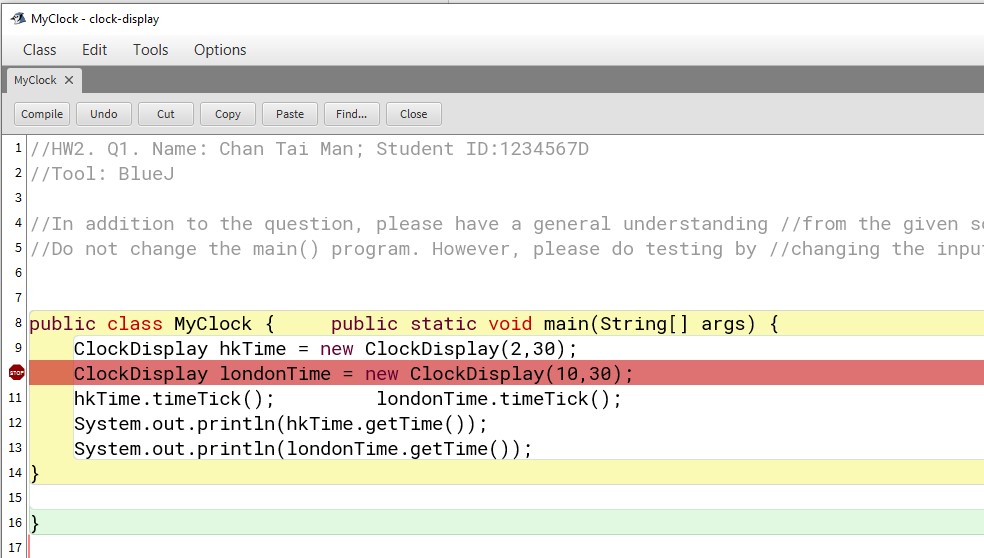
给出的 MyClock(不许改):
//HW2. Q1. Name: Chan Tai Man; Student ID:1234567D
//Tool: BlueJ
//In addition to the question, please have a understanding of all the
//given source codes. E.g. timeTick() is a function to add one minute.
//Do not change the main() program. However, please do testing by
//changing the input number inside ClockDisplay().
public class MyClock
{
    public static void main(String[] args) {
        ClockDisplay hkTime = new ClockDisplay(2,30);
        ClockDisplay londonTime = new ClockDisplay(10,30);
        hkTime.timeTick();        //add one minute
        londonTime.timeTick();    //add one minute
        System.out.println(hkTime.getTime());
        System.out.println(londonTime.getTime());
    }
}
原图
上图是 BlueJ 的类图:MyClock 与 ClockDisplay 之间的箭头表示「MyClock 里创建了 ClockDisplay 对象」,ClockDisplay 又指向两个 NumberDisplay。对象交互题先看类图,它是唯一能一眼看出「谁持有谁」的地方。
讲解
先把给定的两份源码读懂,改造才有落点。NumberDisplay 负责单个两位数字盘:它有一个上限 limit 和一个当前 value,increment() 到顶就回零,getDisplayValue() 把小于 10 的值补成两位。
public void increment() {
    value = (value + 1) % limit;     // 到 limit 自动归零
}

public String getDisplayValue() {
    if (value < 10) return "0" + value;
    else            return "" + value;
}
ClockDisplay 负责组合:两个 NumberDisplay + 一个 displayString 缓存。timeTick() 只干两件事——分钟加一;如果分钟刚好归零,小时加一。最后统一调 updateDisplay() 重算显示串。
public void timeTick() {
    minutes.increment();
    if (minutes.getValue() == 0) {   // it just rolled over!
        hours.increment();
    }
    updateDisplay();
}

private void updateDisplay() {
    displayString = hours.getDisplayValue() + ":" +
                    minutes.getDisplayValue();
}
这就是本题的结构性答案:只改 updateDisplay(),timeTick() 一行都不用动。 计时逻辑(谁进位给谁)和显示逻辑(怎么排版)被分在两个方法里,这是把「改动局部化」设计好了的教科书例子。
参考改法(保留 24 小时内部值,只改显示):
private void updateDisplay() {
    int h = hours.getValue();
    int h12 = h % 12;
    if (h12 == 0) {            // 0 点和 12 点都要显示成 12
        h12 = 12;
    }
    String suffix = (h < 12) ? "a.m." : "p.m.";
    displayString = h12 + ":" + minutes.getDisplayValue() + " " + suffix;
}
用题面的 6 组数据验一遍(注意每组都是「tick 之后」的结果):
| tick 前内部值 | tick 后内部值 | h | h % 12 | h < 12 | 输出 |
|---|---|---|---|---|---|
| 00:00 | 00:01 | 0 | 0 → 12 | true | 12:01 a.m. ✓ |
| 00:01 | 00:02 | 0 | 0 → 12 | true | 12:02 a.m. ✓ |
| 01:02 | 01:03 | 1 | 1 | true | 1:03 a.m. ✓ |
| 11:59 | 12:00 | 12 | 0 → 12 | false | 12:00 p.m. ✓ |
| 12:00 | 12:01 | 12 | 0 → 12 | false | 12:01 p.m. ✓ |
| 23:59 | 00:00 | 0 | 0 → 12 | true | 12:00 a.m. ✓ |
MyClock 的实际输出因此是:
2:31 a.m.
10:31 a.m.
另一条路(把小时直接存成 1–12)为什么更难:NumberDisplay 的 limit 是「取值个数」,limit = 12 得到的是 0..11,根本没有 12;而 12 小时制必须能显示 12。若想走这条路,得把 limit 设成 13(0..12),再额外把 0 映射成 12——这就比「保留 24 内部值」多了两层映射。本题推荐走第一种。
勘误:题面写 “your final output will display the result after adding one second”,但 timeTick() 的注释与实现都是加一分钟(//add one minute),题面给出的 6 组对照也全是分钟级。按「加一分钟」理解。
格式细节:getDisplayValue() 会给小时补零,所以第一种写法自然得到 02:31 a.m. 这种带前导零的形式。题面明确写了 1:03 a.m. (or 01:03 a.m.)——两种都接受。想让输出更贴近样例的 2:31 a.m.,就把 h12 直接拼数字(如上);想保留补零,就用 hours.getDisplayValue() 再改写 12 点。不要混着用。
对应课件
- Ch8 p.20–21(
Declaring/Creating Objects、Accessing Objects):new NumberDisplay(24)与hours.increment()是什么关系。 - Ch8 p.22–29(对象的状态与
Circle例):为什么改displayString就等于改了「看到的东西」,而hours的内部值仍是 24 小时制。 - Ch8 p.55–58(
Instance Variables and Methods):两个NumberDisplay是ClockDisplay的 instance variable,每个ClockDisplay各有一份。 - Ch8 p.73–81(
Passing Objects to Methods):本题用不到「传对象」,但下一题 HW3 会用到同样的引用语义。
本题结论
- 判分点:
main()原样不动;2:31 a.m./10:31 a.m.这一对输出正确;12 点与 0 点两个特例都对。 - 唯一值得记住的设计判断:「内部表示」和「外部显示」是两件事。24 小时内部值 + 12 小时显示串,比「把内部也改成 12 小时」少踩三个坑。
- 自查顺序:先测
00:00、11:59、12:00、23:59四个拐点,再测普通时间。
3.2 Q2(Optional)· Rectangle 类
原文(EN)
| 原文 | 中文 |
|---|---|
| (Optional) Design a class named Rectangle to represent a rectangle. The class should contain the following fields and methods: | (选做)设计一个名为 Rectangle 的类来表示矩形。该类应包含以下字段与方法: |
| Two double data fields named width and height that specify the width and height of the rectangle. The default values are 1 for both width and height. | 两个 double 数据字段 width 与 height,表示矩形的宽和高,默认值都为 1。 |
| A no-arg constructor that creates a default rectangle. | 一个无参构造器,创建默认矩形。 |
| A constructor that creates a rectangle with the specified width and height. | 一个带指定宽高的构造器。 |
| A method named getArea() that returns the area of this rectangle. | 名为 getArea() 的方法,返回矩形面积。 |
| A method named getPerimeter() that returns the perimeter. | 名为 getPerimeter() 的方法,返回周长。 |
| Implement the class Rectangle. Write a test program that creates two Rectangle objects— one with width 4 and height 40 and the other with width 3.5 and height 35.9. Display the width, height, area, and perimeter of each rectangle in this order. Here is a sample run. | 实现 Rectangle 类。写测试程序创建两个 Rectangle 对象——一个宽 4 高 40,另一个宽 3.5 高 35.9。按此顺序显示每个矩形的宽、高、面积、周长。样例运行如下。 |
| The area of a rectangle with width 4.0 and height 40.0 is 160.0 | 宽 4.0 高 40.0 的矩形面积是 160.0 |
| The perimeter of this rectangle is 88.0 | 该矩形的周长是 88.0 |
| The area of a rectangle with width 3.5 and height 35.9 is 125.64999999999999 | 宽 3.5 高 35.9 的矩形面积是 125.64999999999999 |
| The perimeter of this rectangle is 78.8 | 该矩形的周长是 78.8 |
讲解
public class Rectangle {
    double width = 1;      // 声明处直接给默认值
    double height = 1;

    public Rectangle() { }                       // no-arg:靠字段初值
    public Rectangle(double width, double height) {
        this.width = width;
        this.height = height;
    }

    public double getArea()      { return width * height; }
    public double getPerimeter() { return 2 * (width + height); }
}
测试程序:
public class TestRectangle {
    public static void main(String[] args) {
        Rectangle r1 = new Rectangle(4, 40);
        Rectangle r2 = new Rectangle(3.5, 35.9);
        show(r1);
        show(r2);
    }
    static void show(Rectangle r) {
        System.out.println("The area of a rectangle with width "
            + r.width + " and height " + r.height + " is " + r.getArea());
        System.out.println("The perimeter of this rectangle is "
            + r.getPerimeter());
    }
}
三个细节值得注意:
125.64999999999999是正常的,不要「修」它。3.5 * 35.9在二进制浮点里无法精确表示,double直接拼接输出就是这个尾巴。样例把它原样印出来,说明预期就是「不做格式化」。如果擅自用printf("%.2f")或Math.round,输出与样例不符。4会打印成4.0。 因为字段是double,new Rectangle(4, 40)的实参被拓宽成4.0、40.0。这是double与int的隐式转换,正好对应 Ch2–7 里「整型到浮点的自动提升」。- 无参构造器什么都不用写,因为字段在声明处已经初始化成 1;构造器体留空即可。若写成
width = 1; height = 1;也算对,但和字段初值重复。
对应课件:Ch8 p.10–12(类与 UML)、p.16–19(构造器与默认构造器)、p.34–35(字段默认值)、p.64–67(private 与 getter 的分工——本题字段保持包可见是为了让测试类直接读 r.width;若改成 private 就要补 getWidth()/getHeight())。见 EIE3320 Week 2「Constructors」「Default Value for a Data Field」。
本题结论:这题是 Ch8 的「最小完备类」模板,值得背下来:字段带初值 + 两个构造器 + 计算型 getter。它同时是 HW3 的前置——HW3 的 Course 就是同款结构再加一个 toString()。
3.3 Q3(Optional)· mail-system 的对象协作
原文(EN)
| 原文 | 中文 |
|---|---|
| (Optional) Open the “mail-system” project. Create a MailServer object. Create two MailClient objects. When doing this, you need to supply the MailServer instance, which you just created, as a parameter. You also need to specify a username for the mail client. | (选做)打开 mail-system 项目。创建一个 MailServer 对象,再创建两个 MailClient 对象。创建 MailClient 时需要把刚创建的 MailServer 实例作为参数传进去,同时指定用户名。 |
| MailClient objects can be used to send messages from one mail client to another (using the sendMessage method) and to receive messages (using the getNextMailItem or printNextMailItem methods). You may use the following class to create the MailClient and MailServer objects. | MailClient 对象可以用来从一个客户端发消息给另一个(用 sendMessage),也可以收消息(用 getNextMailItem 或 printNextMailItem)。可以用下面这个类创建 MailClient 与 MailServer 对象。 |
public class TestMail
{
    public static void main(String [] args) {
        MailServer ms = new MailServer();           // Line A
        MailClient mc1 = new MailClient(ms, "Peter");
        MailClient mc2 = new MailClient(ms, "Paul");
        mc1.sendMessage("Paul","Hello, I am Peter");
        mc2.sendMessage("Peter","Hello, I am Paul");
    }
}
讲解
这题的形态是「一个中心 + 若干客户端」,也是后面 HW4/HW5 里 Database 持有 ArrayList 的雏形:
MailServer  ←── mc1 (Peter)
            ←── mc2 (Paul)
MailServer内部维护ArrayList<MailItem>,是共享的存储。- 每个
MailClient都持有同一个MailServer引用(构造时传入),外加自己的username。 sendMessage(to, msg)不是「直接塞给对方」,而是「交给服务器,由服务器按收件人名投递」。真正的投递在MailServer里完成。
所以这题真正要观察的是:mc1 和 mc2 之间没有直接引用,它们靠共享同一个 MailServer 通信。 对象交互题只要抓住「谁持有谁」,剩下的方法调用都能顺出来。
收消息的两个方法区别:getNextMailItem() 返回 MailItem 对象(可能为 null),printNextMailItem() 直接打印并把消息取走。要在 BlueJ 的 Terminal 里看到消息,用后者;要拿对象做进一步处理,用前者。
对应课件:Ch8 p.20–21(new 与传参)、p.73–81(Passing Objects to Methods:传的是引用,两个 client 拿到的是同一个 server)。见 EIE3320 Week 2「Accessing Objects」「Primitive Types and Object Types」。
本题结论:这题不写代码,只「动」对象。它的价值在于让你亲眼看到共享引用:在 BlueJ 里创建 mc1、mc2 后,两者内部 server 字段指向同一个对象——这正是 HW4 的 Database 与 HW5 的 searchBy... 的地基。
3.4 Q4(Optional)· 用调试器
原文(EN)
| 原文 | 中文 |
|---|---|
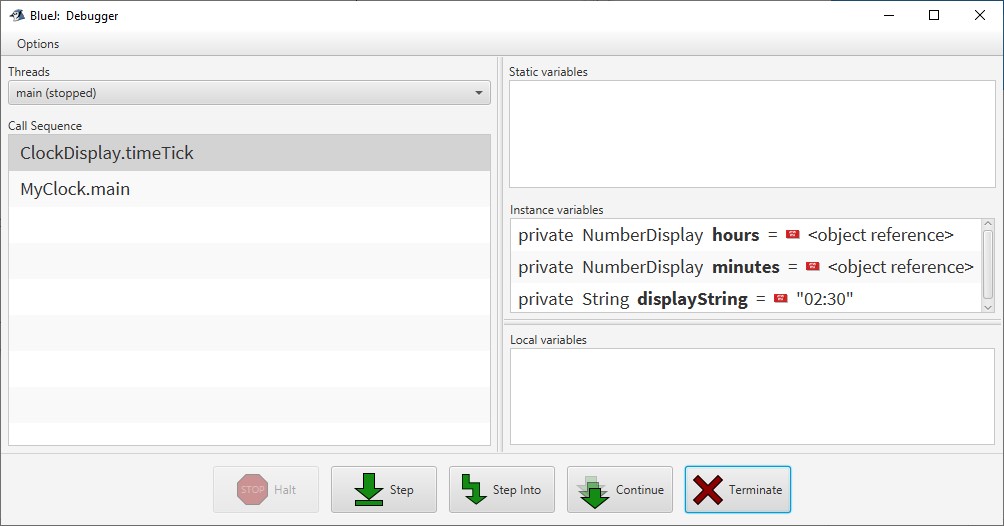
| (Optional) This part is to use the Debugger. Set a breakpoint at Line A of TestMail. Then run the TestMail program. Use the Step into function to step into the constructor of MailServer. In the debugger, you can see the instance variables and local variables. | (选做)这部分用调试器。在 TestMail 的 Line A 设断点,然后运行 TestMail。用 Step into 进入 MailServer 的构造器。在调试器里可以看到实例变量与局部变量。 |
原图
讲解
这题在所有作业里唯一一次要求「看见运行中的状态」。三步:
- 设断点:在行号左侧边距点一下(BlueJ)/ 双击行号(Eclipse)。
Step into:进入被调用方法的内部;Step(Eclipse 叫Step over)则把整个方法当一步走完。- 看变量:BlueJ 的 Debugger 窗口分
Static variables/Instance variables/Local variables三栏,this也要看。
对 TestMail 来说,断在 Line A 时 ms 还没被赋值(显示 <object reference> 或未初始化);Step into 进入 MailServer() 后,能看到它的 items 字段被 new ArrayList 赋值。
附录里给了完整的 BlueJ 截图流程(编译、类图、inspect、断点、Step/Step Into/Continue/Terminate、Terminal 窗口、Eclipse 对照),这里不再重复贴图;只要记住 BlueJ 的 Inspect 与 Debugger 的 Instance variables 看的是同一份状态,前者是快照、后者可以单步推进。
对应课件:无对应章。这是工具技能,BlueJ Getting Started_Revised.pdf 是原始文档。
本题结论:断点是「把抽象的对象状态具象化」的唯一手段。HW3 的可选第 3 题(看 GradeBookDemo 的局部变量)和 HW4 的可选第 1 题(看 notebook2)都是同一套动作。
4. HW3 · OOP (Grouping Objects)
4.0 HW3 结构
| 序 | 题目 | 必做 | 训练点 | 对应课件 |
|---|---|---|---|---|
| Q1 | Course + UniversityStudent | ✅ | 对象数组、toString() 委派、容量 vs 实际条数 | Ch8 p.10–19、p.39–45(数组);Ch10 p.15–23(类设计) |
| Q2 | Auto layout | 缩进规范 | 无 | |
| Q3 | Clear screen at method call | 终端清屏 | 无 | |
| Q4 | 断点 | 调试 | 无 | |
| Q5 | 行号显示 + Auction 里的类型转换 | 泛型与强制转换 | Ch11 p.60–66(casting)、p.88–97(ArrayList 泛型) |
HW3 的标题叫 “Grouping Objects”——直译「把对象聚起来」。它只有一个必做题,但把 Ch8 的对象 + 数组和 Ch10 的类设计缝在了一起,也是第一次出现「类 A 的方法里必须调用类 B 的方法」这种硬性要求。
4.1 Q1(Compulsory)· Course 与 UniversityStudent
原文(EN)
| 原文 | 中文 |
|---|---|
| (Compulsory) Create two classes Course and UniversityStudent. | (必做)创建 Course 与 UniversityStudent 两个类。 |
| The class Course is to represent a course. It has two data fields and two methods. | Course 类表示一门课程,有两个数据字段和两个方法。 |
| Data field courseName: It is a string to store the name of the course. | 数据字段 courseName:字符串,存课程名。 |
| Data field testMarks: It is an integer to store the result of the course. | 数据字段 testMarks:整数,存该课程的成绩。 |
| Constructor: It gets the name and the result of the course when an object is created. | 构造器:创建对象时接收课程名与成绩。 |
| Method toString: It returns a string with the name and the result of the course. Note that no arguments should be passed to this method. | 方法 toString:返回包含课程名与成绩的字符串。注意:此方法不带任何参数。 |
| The class UniversityStudent is to represent a university student. It has three data fields and two methods. | UniversityStudent 类表示一名大学生,有三个数据字段和两个方法。 |
| Data field studentName: It is a string to store the student’s name. | 数据字段 studentName:字符串,存学生姓名。 |
| Data field courseNumber: It is an integer to store the number of courses that the student takes. | 数据字段 courseNumber:整数,存该学生所修课程的门数。 |
| Data field courseList: It is an array to store objects created from the class Course. | 数据字段 courseList:数组,存放由 Course 类创建的对象。 |
| Constructor: It gets the student’s name, the number of courses that the student takes and an array of objects from the class Course when an object is created. The array size should be 10. | 构造器:创建对象时接收学生姓名、所修课程门数、以及一个 Course 对象数组。数组大小应为 10。 |
| Method print: It displays the student’s name and the information of all courses that the student takes. Note that no arguments should be passed to this method. Moreover, you MUST invoke the method toString in objects from the class Course. | 方法 print:显示学生姓名以及该学生所修全部课程的信息。注意:此方法不带任何参数。此外,必须调用 Course 对象的 toString 方法。 |
| The testing program is shown below: | 测试程序如下: |
public class Test1Q2A
{
    public static void main(String[] args)
    {
        Course[] listA = new Course[10];
        listA[0] = new Course("EIE3320", 60);
        listA[1] = new Course("EIE3105", 40);
        UniversityStudent studentA = new UniversityStudent("John", 2, listA);
        studentA.print();

        Course[] listB = new Course[10];
        listB[0] = new Course("COMP1001", 84);
        listB[1] = new Course("EIE3105", 68);
        listB[2] = new Course("EIE3320", 52);
        UniversityStudent studentB = new UniversityStudent("Mary", 3, listB);
        studentB.print();
    }
}
原图
这张输出图是本题唯一的格式依据,务必逐字符比对:
Student Name: John
EIE3320, 60
EIE3105, 40
Student Name: Mary
COMP1001, 84
EIE3105, 68
EIE3320, 52
讲解
Course 是 HW2 Q2 Rectangle 的同款模板再加一个 toString():
public class Course {
    private String courseName;
    private int testMarks;

    public Course(String courseName, int testMarks) {
        this.courseName = courseName;
        this.testMarks = testMarks;
    }

    public String toString() {
        return courseName + ", " + testMarks;   // 输出图里是「名, 空格 分」
    }
}
UniversityStudent 的关键在 print()——只循环 courseNumber 次,不能循环 courseList.length:
public class UniversityStudent {
    private String studentName;
    private int courseNumber;
    private Course[] courseList;

    public UniversityStudent(String studentName, int courseNumber, Course[] courseList) {
        this.studentName = studentName;
        this.courseNumber = courseNumber;
        this.courseList = courseList;
    }

    public void print() {
        System.out.println("Student Name: " + studentName);
        for (int i = 0; i < courseNumber; i++) {   // ← 不是 courseList.length
            System.out.println(courseList[i].toString());   // 题目点名要调 toString
        }
    }
}
为什么这一行是全题的命门:测试程序给的是 new Course[10],但 John 只放了 2 个、Mary 只放了 3 个,其余 7–8 个槽位是 null。如果循环写 i < courseList.length,第 3 次(listA[2])就会 NullPointerException。题目特意把「数组大小 10」和「课程门数 2/3」拆成两个字段,就是为了考这一点:容量 ≠ 实际条数。
三个格式细节:
"Student Name: "后面是空格,不是逗号。- 课程行是
名 + ", " + 分(图中EIE3320, 60)。 - 两段之间没有空行——
Mary的Student Name:紧跟在 John 最后一行之后。
courseList[i].toString() 也可以写成 "" + courseList[i] 或 System.out.println(courseList[i])(println 会自动调 toString)。但既然题目写了 “you MUST invoke the method toString”,就显式写出来,避免被判「没按要求」。
勘误 / 说明:测试类名为 Test1Q2A,与本题(HW3 Q1)的编号不一致,是从旧版题目沿用的类名。不要改类名——Test1Q2A.java 的文件名必须与类名一致,改了反而编译不过。
对应课件
- Ch8 p.10–12(类与 UML 类图)、p.16–19(构造器):
Course的两个字段 + 一个构造器。 - Ch8 p.39–45(
Introducing Arrays/Creating Arrays/Default Values):new Course[10]之后元素默认值是null,这一页就是NullPointerException的来源。 - Ch8 p.46(
CAUTION):数组越界与null元素。 - Ch10 p.15–23(类抽象与封装、
Loan例):为什么print()该是一行调用,而不是让调用者自己拼字符串。 - Ch11 p.47–49(
Object的toString):如果你不写toString(),println会打印Course@1b6d3586这种哈希串——这正是下一段「覆盖toString」的动机。
本题结论
- 判分点:输出逐字符一致(含
Student Name:的空格、课程行的,);print()循环用courseNumber;必须调用Course.toString()。 - 一个可以复用的判断:凡是「容器 + 条数」两个字段并存,循环一律用条数。
- 这题写对了,HW4 的
Database.list()就是同一件事换成ArrayList+Iterator。
4.2 Q2–Q4(Optional)· 三个 BlueJ 习惯
原文(EN)
| 原文 | 中文 |
|---|---|
| (Optional) In BlueJ, turn on Auto layout by selecting Edit -> Auto layout. Auto layout is a highly useful feature that automatically indents your code. Proper indentation is a best programming practice because it organizes your code into clear structural levels, making it much easier to read and debug. | (选做)在 BlueJ 中通过 Edit -> Auto layout 打开自动排版。自动排版会自动缩进代码,是非常有用的功能。正确的缩进是最佳实践,因为它把代码组织成清晰的结构层级,更易读、易调试。 |
| (Optional) In BlueJ’s Terminal Window, enabling “Clear screen at method call” is another excellent practice. It ensures that every time you run your main program, the terminal wipes away all previous text, giving you a clean screen dump so you can debug your current run without confusion. | (选做)在 BlueJ 的 Terminal 窗口中启用 “Clear screen at method call” 也是很好的实践。它保证每次运行主程序时终端清掉之前所有文字,给你干净的输出,便于调试当前这次运行。 |
| (Optional) In BlueJ, you can add breakpoint(s) by clicking the leftmost margin of the code editor. The next time you run your program, execution will pause at that line, allowing you to inspect live data such as temporarily stored values. You can then click “Step” or “Continue” to proceed. | (选做)在 BlueJ 中点击代码编辑器最左侧边距即可加断点。下次运行程序时执行会暂停在该行,让你查看临时存储值等实时数据,然后点 “Step” 或 “Continue” 继续。 |
原图
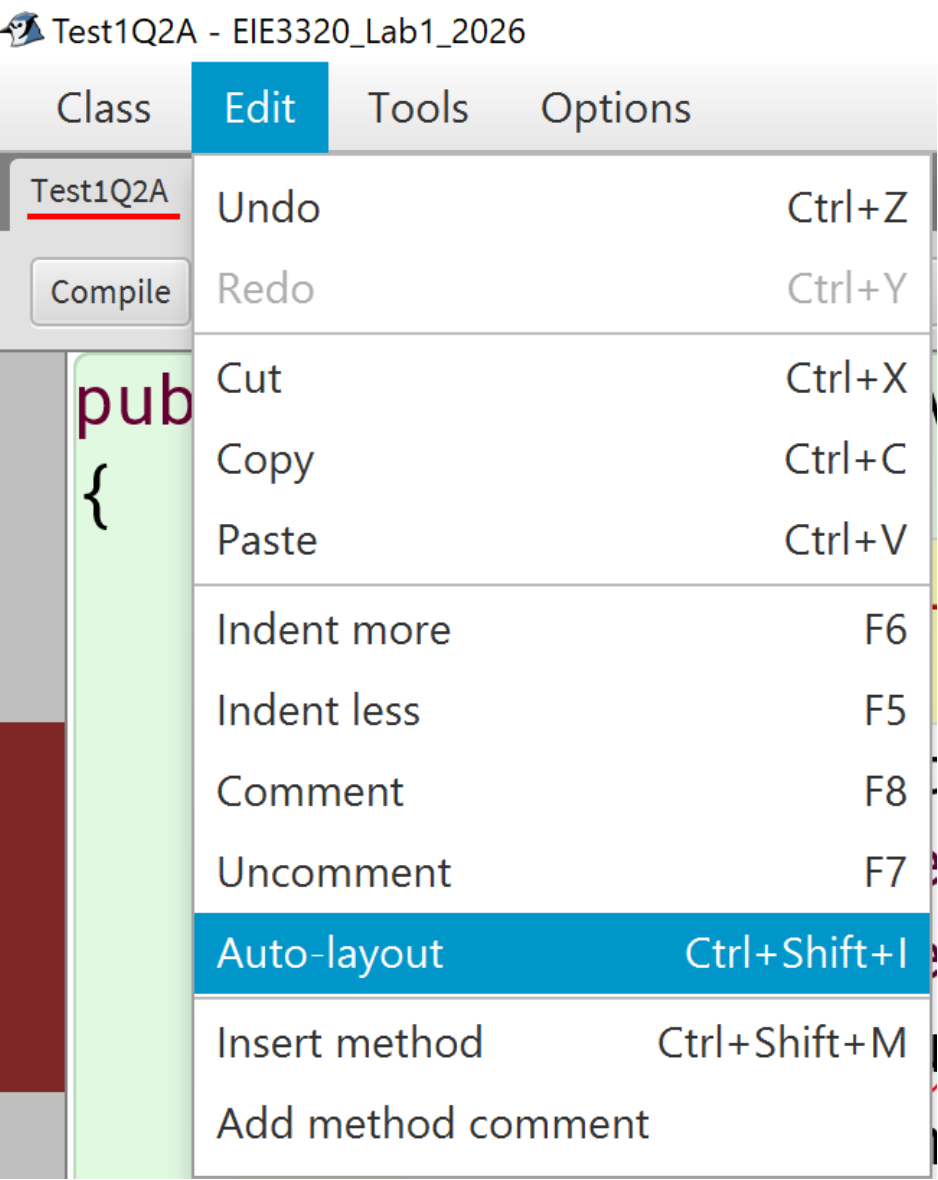
上图是 Test1Q2A 里 Edit 菜单打开的样子,Auto-layout 就在其中(快捷键 Ctrl+Shift+I)。注意左侧 Test1Q2A 下方那条红色波浪线:它表示该类有编译错误——而这正是练习「先修红波浪线再运行」的现场。
讲解
这三条都不是「知识点」,而是「让前一条知识点能被看见」的工具:
| 习惯 | 解决什么问题 | 为什么值得养成 |
|---|---|---|
| Auto layout | 缩进乱七八糟 | 缩进错了通常意味着 {} 配错,Auto layout 会把它暴露出来 |
| Clear screen at method call | 上一次运行的输出还在 | 输出对比题(HW1 Q1、HW3 Q1)靠肉眼比对,混着旧输出必看错 |
| 断点 | 只能看到最终结果 | 循环中间值、null 出现的瞬间,只有断点能抓到 |
本题结论:这三条与 HW2 Q4 是同一套动作的复用;Clear screen at method call 做 HW1–HW3 的输出对比时尤其省事。
4.3 Q5(Optional)· 行号、Auction 与类型转换
原文(EN)
| 原文 | 中文 |
|---|---|
| (Optional) Turn on Line Number Display by selecting Tool > Preferences > Display Line Numbers. Find examples of casting in the Auction class (You can find the class in BlueJProjects/Projects/chapter04/auction). Starting from Java 5, casting is not necessary for the get() method. Try removing the casting in Line 70 of “Aution.java”, i.e., removing (Lot) in | (选做)通过 Tool > Preferences > Display Line Numbers 打开行号显示。在 Auction 类中找类型转换的例子(该类在 BlueJProjects/Projects/chapter04/auction)。从 Java 5 起,get() 方法已不需要类型转换。试着删掉 Auction.java 第 70 行的类型转换,即删掉其中的 (Lot): |
| Then, recompile “Auction.java”. Read the Java API to see why casting is not necessary. Now, remove the casting in Line 46 of “Aution.java”. | 然后重新编译 Auction.java。查阅 Java API 理解为什么不需要类型转换。接着删掉 Auction.java 第 46 行的类型转换。 |
| Recompile the program and you will see that it fails to compile. Modify Line 44 to solve the problem. | 重新编译,你会看到编译失败。修改第 44 行来解决问题。 |
原图

讲解
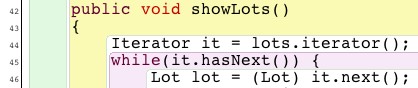
先把三行原文钉死(Auction.java 的真实行号):
| 行 | 原文 | 说明 |
|---|---|---|
| 12 | private ArrayList<Lot> lots; | 泛型声明——这是整题的前提 |
| 44 | Iterator it = lots.iterator(); | 裸类型(raw type)Iterator |
| 46 | Lot lot = (Lot) it.next(); | 因为 it 是裸的,next() 返回 Object,必须强转 |
| 70 | Lot selectedLot = (Lot) lots.get(number-1); | lots 是 ArrayList<Lot>,get() 已经返回 Lot,强转多余 |
三步走:
第一步:删第 70 行的 (Lot) → 仍能编译。
因为 lots 声明为 ArrayList<Lot>,泛型让 get(int) 的返回类型直接就是 Lot。这是 Java 5 引入泛型之后的变化;在 Java 1.4 里 ArrayList.get() 返回 Object,那时这行强转是必需的。题目说的 “Starting from Java 5, casting is not necessary for the get() method” 指的就是这件事。
第二步:删第 46 行的 (Lot) → 编译失败。
报错大意:incompatible types: Object cannot be converted to Lot。原因不在 ArrayList,而在第 44 行声明的是裸 Iterator——没有泛型参数,next() 只能返回 Object。
第三步:改第 44 行。
Iterator<Lot> it = lots.iterator(); // 加泛型参数改完之后 it.next() 返回 Lot,第 46 行的强转可以永久删掉。
或者更现代、也更贴近 ch11 p.97 的写法,直接省掉 Iterator:
for (Lot lot : lots) {
    System.out.println(lot.getNumber() + ": " + lot.getDescription());
    ...
}这一题真正想教的:ArrayList<Lot> 只让 ArrayList 的方法「变聪明」;iterator() 返回的 Iterator 是否聪明,取决于你怎么声明那个变量。这正是 ch11 p.88–97 那一串 ArrayList 页(以及 ch14 p.39–43 的 List/ArrayList)在讲的事。
对应课件
- Ch11 p.60–66(
Casting Objects、Why Casting Is Necessary?、Casting from Superclass to Subclass):向上转型自动、向下转型必须显式。本题是它的「泛型版」。 - Ch11 p.78–87(
Java Generics、Generic Methods、Generic Classes):<Lot>这种尖括号从哪来。 - Ch11 p.88–97(
ArrayList):ArrayList的常用方法与泛型的限制(ArrayList<int>非法)。 - Ch14 p.39–43(
Interface List and Class ArrayList、泛型List<String>):为什么有时声明成List<Lot> lots = new ArrayList<Lot>();。 - Ch11 p.97 的
for (int i = 0; i < names.size(); i++)与for-each的对照。
本题结论
ArrayList<T>的get()不需要强转;裸Iterator的next()需要。- 修法只有一条:把
Iterator声明成Iterator<T>,而不是在每次next()前加强转。 - 顺带记住:
for (Lot lot : lots)是这段代码的最终形态,HW4 Q3 会让人亲手比较它和索引访问的差别。
5. HW4 · OOP (Inheritance)
5.0 HW4 结构
| 序 | 题目 | 必做 | 训练点 | 对应课件 |
|---|---|---|---|---|
| Q1 | VideoGame(不继承) | ✅ | 手写重复字段,体会冗余 | Ch8 p.10–19、p.55–58 |
| Q2 | Item 父类 + 三个子类 | ✅ | extends、super()、覆盖 print() | Ch11 p.7–22、p.26–38、p.42–46 |
| Q3 | notebook2:索引、size()、Iterator | 集合遍历的三种写法 | Ch11 p.88–97;Ch14 p.39–43 | |
| Q4 | RunTimeComparison:Iterator vs get() | 时间复杂度直觉 | Ch11 p.88–97 | |
| Q5 | MyHashMap | 继承 JDK 类、entrySet | Ch11 p.47–49(Object 方法) | |
| Q6 | MyArrayList | 继承 ArrayList、泛型构造器 | Ch11 p.78–87 | |
| — | 勘误 | 题号 3、4 未打印 | — |
HW4 是全学期最重要的一份:Q1 先让你写一遍「四个字段在三个类里各写一次」,Q2 再把它们收进 Item。这个「先痛一次再重构」的顺序不是偷懒,而是在制造对比记忆——写 Q2 的时候你会非常清楚 super(title, time) 到底省掉了哪几行。
5.1 Q1(Compulsory)· 新增 VideoGame(还没有继承)
原文(EN)
| 原文 | 中文 |
|---|---|
| (Compulsory) Create a new class VideoGame. | (必做)新建一个 VideoGame 类。 |
| Download the BlueJ project “dome-v1.zip” from Canvas. | 从 Canvas 下载 BlueJ 项目 dome-v1.zip。 |
| Add a new class called “VideoGame”. Add instance members “title”, “platform”, “numberOfPlayers”, “playingTime”, “gotIt” and “comment” to the new class. Moreover, add methods setComment(), getComment(), setOwn(), getOwn(), and print() to the new class. | 新增一个名为 VideoGame 的类。为它添加实例成员 title、platform、numberOfPlayers、playingTime、gotIt、comment。此外添加方法 setComment()、getComment()、setOwn()、getOwn()、print()。 |
| Modify the class Database: | 修改 Database 类: |
| Create an array list called videoGames to store some VideoGames objects. | 创建一个名为 videoGames 的数组列表,存放 VideoGame 对象。 |
| Add a new method addVideoGame(VideoGame theVideoGame) which is used to add a VideoGame object to the array list videoGames. | 新增方法 addVideoGame(VideoGame theVideoGame),用于把一个 VideoGame 对象加入 videoGames 列表。 |
| Modify the method list() to print all CD, Video and VideoGame objects. | 修改 list() 方法,打印所有 CD、Video 与 VideoGame 对象。 |
| Use the class TestDatabase (uncomment all statements related to the class VideoGame inside the class file) to check the correctness of your program codes. The class diagram and the output should be shown below: | 用 TestDatabase 类(把类文件里所有与 VideoGame 相关的语句取消注释)检查代码正确性。类图与输出应如下所示: |
原图
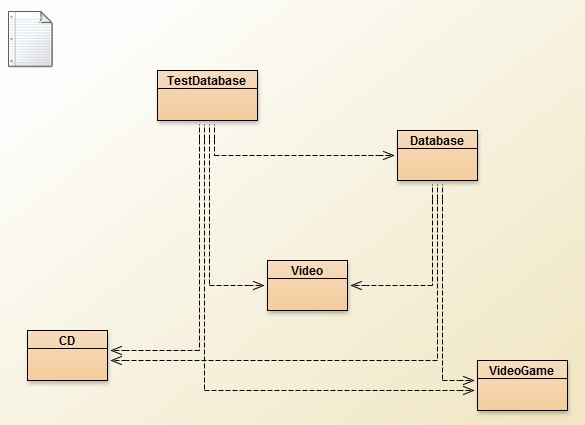
类图(Q1 结束时的形态)——五个类平级,没有任何继承箭头:
TestDatabase ──▶ Database
     │              │
     ├──▶ CD ◀──────┤
     ├──▶ Video ◀───┤
     └──▶ VideoGame ◀┘
TestDatabase 依赖全部四个类(它负责 new 出对象);Database 只依赖它真正要调用的 CD、Video、VideoGame。虚线箭头表示「创建/调用」,不是继承。
给定输出(Q1):
CD
Title: Joey & Joey
Got it: Yes
Playing time: 60
Comment: My favorite album
Artist: Joey Yung
No. of tracks: 11

Video
Title: Matrix
Got it: Yes
Playing time: 137
Comment: My favorite movie
Director: Wachowski Brothers

VideoGame
Title: Final Fantasy
Got it: No
Playing time: 30
Comment: My favorite VideoGame
Platform: Windows
No. of players: 2
讲解
dome-v1 里的 Database 是「每个类型一个 ArrayList」的写法:
public class Database {
    private ArrayList cds;
    private ArrayList videos;
    // Q1 要你再加一个
    private ArrayList videoGames;

    public Database() {
        cds = new ArrayList();
        videos = new ArrayList();
        videoGames = new ArrayList();      // ← 加
    }

    public void addCD(CD theCD)          { cds.add(theCD); }
    public void addVideo(Video theVideo) { videos.add(theVideo); }
    public void addVideoGame(VideoGame theVideoGame) {
        videoGames.add(theVideoGame);      // ← 加
    }

    public void list() {
        for (Iterator iter = cds.iterator(); iter.hasNext(); ) {
            CD cd = (CD)iter.next();  cd.print();  System.out.println();
        }
        for (Iterator iter = videos.iterator(); iter.hasNext(); ) {
            Video v = (Video)iter.next();  v.print();  System.out.println();
        }
        for (Iterator iter = videoGames.iterator(); iter.hasNext(); ) {   // ← 加
            VideoGame g = (VideoGame)iter.next();  g.print();  System.out.println();
        }
    }
}
注意三件事,它们都能从输出图倒推出来:
- 输出顺序是 CD → Video → VideoGame,因为
list()就是按这个顺序遍历三个列表。这解释了为什么 Q2 换成单个items列表后,顺序变成了CD, CD, Video, Video, VideoGame(插入顺序)。 VideoGame的Got it是No,因为dome-v1的TestDatabase里显式写了videoGame1.setOwn(false);——而CD/Video都是setOwn(true)。这是题面唯一一处「三兄弟不一致」的地方,抄输出时最容易漏。VideoGame的print()输出 6 行,前 4 行与CD完全同形(Title/Got it/Playing time/Comment),后 2 行是Platform/No. of players。这个「前 4 行完全重复」正是 Q2 要消灭的东西。
VideoGame 的实现(此时只能照抄 CD 的结构):
public class VideoGame {
    private String title;
    private String platform;
    private int numberOfPlayers;
    private int playingTime;
    private boolean gotIt;
    private String comment;

    public VideoGame(String theTitle, String thePlatform,
                     int thePlayers, int time) {
        title = theTitle;
        platform = thePlatform;
        numberOfPlayers = thePlayers;
        playingTime = time;
        gotIt = true;              // 与 Item 一致
        comment = "";
    }

    public void setComment(String comment) { this.comment = comment; }
    public String getComment()             { return comment; }
    public void setOwn(boolean ownIt)      { gotIt = ownIt; }
    public boolean getOwn()                { return gotIt; }

    public void print() {
        System.out.println("Title: " + title);
        if (gotIt) System.out.println("Got it: Yes");
        else       System.out.println("Got it: No");
        System.out.println("Playing time: " + playingTime);
        System.out.println("Comment: " + comment);
        System.out.println("Platform: " + platform);
        System.out.println("No. of players: " + numberOfPlayers);
    }
}
构造器参数顺序的依据是 TestDatabase 里的调用 new VideoGame("Final Fantasy", "Windows", 2, 30):标题、平台、人数、时长。参数顺序看调用方,不要自己发明。
对应课件
- Ch8 p.10–12(类与 UML)、p.16–19(构造器)、p.55–58(instance variable 与 static 的区别)。
- Ch8 p.64–67(
Visibility Modifiers and Access Control):为什么字段写private、方法写public。
本题结论
- 判分点:三项都做到(新类、
videoGames+addVideoGame、list()三连打印);输出与给定图逐行一致,尤其VideoGame的Got it: No。 - 这一题的「正确」恰恰是「冗余」:同一段
print()写了两遍半。记住这种手感,下一题就知道该删什么。
5.2 Q2(Compulsory)· 抽出 Item 父类
原文(EN)
| 原文 | 中文 |
|---|---|
| (Compulsory) Build inheritance for the class CD, Video and VideoGame. | (必做)为 CD、Video、VideoGame 建立继承关系。 |
| Download the BlueJ project “dome-v2.zip” from Canvas. | 从 Canvas 下载 BlueJ 项目 dome-v2.zip。 |
| Create the class CD and Video, and modify the class VideoGame. Their instance members and methods should be the same as that in Question 1 but this time you need to make use of the superclass Item. Note that some instance members and methods built in the superclass are not required to be built again in the subclass. You should modify the codes in this project to get the following class hierarchy. | 创建 CD 与 Video 类,并修改 VideoGame 类。它们的实例成员与方法应与第 1 题相同,但这次要利用父类 Item。注意:父类里已经建好的某些实例成员与方法,子类不需要再写一遍。修改本项目的代码,得到下面的类层次结构。 |
| The output of the class TestDatabase is shown on the next page (uncomment all statements related to the class CD, Video and VideoGame inside the class file). | TestDatabase 的输出见下页(把类文件里所有与 CD、Video、VideoGame 相关的语句取消注释)。 |
原图
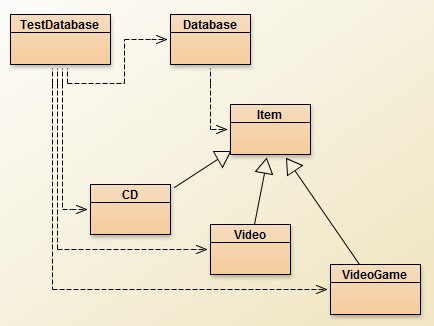
类图(Q2 结束时的形态)——三个空心三角箭头从子类指向 Item:
                ┌──────────┐
                │   Item   │        (title, playingTime, gotIt, comment)
                └────▲─────┘
          ┌──────────┼──────────┐
       ┌──┴──┐    ┌──┴───┐   ┌──┴────────┐
       │ CD  │    │Video │   │ VideoGame │
       └─────┘    └──────┘   └───────────┘
     artist,      director,    platform,
     numberOfTracks            numberOfPlayers
给定输出(Q2):CD, CD, Video, Video, VideoGame 五条,全部 Got it: Yes。与 Q1 的差别是顺序(单列表 = 插入顺序)与**VideoGame 变成 Yes**(dome-v2 的 TestDatabase 里是 videoGame1.setOwn(true);)。
讲解
dome-v2 已经把父类写好了,它长这样(不要改它):
public class Item {
    private String title;
    private int playingTime;
    private boolean gotIt;
    private String comment;

    public Item(String theTitle, int time) {
        title = theTitle;
        playingTime = time;
        gotIt = true;
        comment = "";
    }

    public String getTitle()          { return title; }   // ← HW5 会用到
    public void setComment(String c)  { this.comment = c; }
    public String getComment()        { return comment; }
    public void setOwn(boolean ownIt) { gotIt = ownIt; }
    public boolean getOwn()           { return gotIt; }

    public void print() {
        System.out.println("Title: " + title);
        if (gotIt) System.out.println("Got it: Yes");
        else       System.out.println("Got it: No");
        System.out.println("Playing time: " + playingTime);
        System.out.println("Comment: " + comment);
    }
}三个子类因此只需要两件新字段 + 一个构造器 + 一段覆盖的 print():
public class CD extends Item {
    private String artist;
    private int numberOfTracks;

    public CD(String theTitle, String theArtist, int tracks, int time) {
        super(theTitle, time);            // ← 必须先调父类构造器
        artist = theArtist;
        numberOfTracks = tracks;
    }

    public void print() {
        super.print();                    // ← 先复用父类的 4 行
        System.out.println("Artist: " + artist);
        System.out.println("No. of tracks: " + numberOfTracks);
    }
}

public class Video extends Item {
    private String director;

    public Video(String theTitle, String theDirector, int time) {
        super(theTitle, time);
        director = theDirector;
    }

    public void print() {
        super.print();
        System.out.println("Director: " + director);
    }
}

public class VideoGame extends Item {
    private String platform;
    private int numberOfPlayers;

    public VideoGame(String theTitle, String thePlatform, int players, int time) {
        super(theTitle, time);
        platform = thePlatform;
        numberOfPlayers = players;
    }

    public void print() {
        super.print();
        System.out.println("Platform: " + platform);
        System.out.println("No. of players: " + numberOfPlayers);
    }
}四个必须理解的点:
super(...)必须在子类构造器的第一条语句。 这是 Java 的硬规则(ch11 p.24 的CAUTION)。不写super(...)时编译器会自动插入super()(无参版),而Item没有无参构造器 → 编译报错。这一条正好是 ch11 p.37–38 的Apple/Fruit例子。print()是覆盖(overriding),不是重载。 签名完全相同(无参、返回void)。ch11 p.42–46 专门对比了这两者;如果用print(String)就变成重载,Database里的item.print()会调到父类版本,后两行就消失了。super.print()是复用,不是必须。 也可以把父类的 4 行抄一遍再补两行——能过,但那就退化成 Q1 了。题目说 “some instance members and methods built in the superclass are not required to be built again in the subclass”,指的就是这 4 行。Database不需要改。dome-v2的Database已经是ArrayList<Item>+addItem(Item):
private ArrayList<Item> items;
public void addItem(Item theItem) { items.add(theItem); }

public void list() {
    for(Iterator iter = items.iterator(); iter.hasNext(); ) {
        Item item = (Item)iter.next();
        item.print();                        // ← 多态调用,见 HW5
        System.out.println();
    }
}
item.print() 这一行看起来是在调 Item.print(),实际执行的是每个对象自己的 print()。list() 一行都不用改就能打印三种不同格式——这就是继承带来的第一层收益。动态绑定的正式名字在 ch11 p.53–59,HW5 会正式用到。
勘误 / 提示:dome-v2 里 Item 是具体类(可以用 new Item(...) 造出来)。到 ch14 你会学到把它改成 abstract class Item 更合适——因为一个「既不是 CD 也不是 Video 也不是 VideoGame 的 Item」没有意义。这是 ch14 p.3–17 的主题,本题不必改(改了也能过,属于加分理解)。
对应课件
- Ch11 p.7(
Superclasses and Subclasses类图):本题类图的教科书版本。 - Ch11 p.8–10(
GeometricObject1):父类该放哪些字段与方法的范本——Item与它几乎同构。 - Ch11 p.11–13(
Circle4):super(color, filled)与「注释掉 setColor/setFilled」的对比,就是本题super(title, time)的对照。 - Ch11 p.14–16(
Rectangle1):同一件事的另一种写法(先this.width = ...再setColor(...)),页面上那个 “Q. Any alternative way? A. super(color, filled);” 正是本题的选择。 - Ch11 p.19–22(父类构造器是否被继承、
super()永远被调用)。 - Ch11 p.26–38(构造器链与
this()/super()的追踪):new CD(...)会先跑Item(...)再跑CD(...)。 - Ch11 p.42–46(overriding 与 overloading 的区别):
print()vsprint(String)。 - Ch11 p.47–49(
Object.toString):为什么println(item)默认打印哈希串。
本题结论
- 判分点:
extends Item三处;三个构造器首行super(...);三个print()首行super.print();输出五条、顺序为插入顺序、全部Got it: Yes。 Database与TestDatabase只取消注释,不改逻辑——如果改动了list(),说明print()覆盖没写对。- 自检:把
super.print()临时删掉,输出应只剩后两行(Artist/No. of tracks)。能复现这个现象,说明覆盖关系真的建立了。
5.3 Q3(Optional)· notebook2:索引、size() 与 Iterator
编号说明:原文这一题没有打印题号(
(Optional) Download the BlueJ project "BlueJProjects.zip"...),按位置是第 3 题。下一题同样未编号。原文的5./6.是从旧版沿用的编号,因此实际是「3、4 未编号 + 5、6 有编号」——勘误:题号不连续。
原文(EN)
| 原文 | 中文 |
|---|---|
| (Optional) Download the BlueJ project “BlueJProjects.zip” from Canvas and decompress the zip file to your home directory. | (选做)从 Canvas 下载 BlueJProjects.zip 并解压到主目录。 |
| Invoking BlueJ and open the project “notebook2” in Chapter 4 by clicking “File” > “Open Project”. | 启动 BlueJ,通过 “File” > “Open Project” 打开第 4 章的 notebook2 项目。 |
| Create a Notebook object. Store a few notes into it. Check that the number of notes returned by numberOfNotes() matches the number that you stored. When you use the showNote() method, you will need to use a parameter value of 0 to print the first note, 1 to print the second note, and so on. Try using the removeNote() method to remove a note. Then, use the showNote() method to print the notes in the list. Note: showNote() and removeNote() can be copied from the “notebook1” project. | 创建一个 Notebook 对象,存入几条笔记。检查 numberOfNotes() 返回的数量与你存入的数量一致。使用 showNote() 时,参数 0 打印第一条、1 打印第二条,依此类推。试用 removeNote() 删除一条笔记,再用 showNote() 打印列表中的笔记。注:showNote() 与 removeNote() 可从 notebook1 项目复制。 |
| Modify showNote() and removeNote() to print out an error if the note number entered was invalid. | 修改 showNote() 与 removeNote(),在传入的笔记编号非法时打印错误信息。 |
| Modify the listNotes() method so that it prints the value of the index local variable in front of each note. For instance: 0: Buy some bread. 1: Recharge phone. 2: 11.30: Meeting with John. | 修改 listNotes(),在每条笔记前面打印索引局部变量的值。例如:0: Buy some bread. 1: Recharge phone. 2: 11.30: Meeting with John. |
| Within a single execution of the listNotes() method, the notes collection is asked repeatedly how many notes it is currently storing. This is done every time the loop condition is checked. Does the value returned by size() vary from one check to the next? If no, the execution speed can be increased by rewriting the listNotes() method so that the size of the notes collection is determined only once and stored in a local variable prior to the execution of the loop. Then use the local variable in the loop’s condition rather than calling size(). Check that this version gives the same results. | 在 listNotes() 的一次执行中,每次检查循环条件都会向笔记集合询问它当前存了多少条。这个 size() 返回值在两次检查之间会变吗?如果不会,就可以把集合大小在循环开始前只取一次、存进局部变量,循环条件用该变量而不是调用 size(),从而提升执行速度。验证改写后结果相同。 |
| Change your notebook so that notes are numbered starting from 1 rather than 0. Remember that the ArrayList object will still be using indices starting from zero, but you can present the notes number from 1 in your listing. Make sure you modify listNotes() and removeNote() appropriately. | 把笔记编号改成从 1 开始而不是 0。记住 ArrayList 的下标仍然从 0 开始,你只是在列表中显示时从 1 编号。确保相应修改 listNotes() 与 removeNote()。 |
| Rewrite listNotes() so that its elements are accessed by using an Iterator object instead of using array indexes. State the advantage(s) of using Iterator instead of array indexing in accessing the array list. | 把 listNotes() 改为使用 Iterator 对象访问元素,而不是数组下标。说明用 Iterator 访问数组列表相比下标访问的优点。 |
讲解
这一题是 HW4 里唯一「纯重构、不新增功能」的题,它把同一段遍历改了三遍,正好对应三种写法:
// ① 下标 + 每次都问 size()
for (int i = 0; i < notes.size(); i++) {
    System.out.println(i + ": " + notes.get(i));
}

// ② 下标 + size() 只取一次
int count = notes.size();
for (int i = 0; i < count; i++) {
    System.out.println((i + 1) + ": " + notes.get(i));   // 显示从 1 编号
}

// ③ Iterator
Iterator<Note> it = notes.iterator();
int index = 1;
while (it.hasNext()) {
    System.out.println(index + ": " + it.next());
    index++;
}
四个小问的答案:
| 小问 | 结论 |
|---|---|
size() 在循环中会变吗? | 不会。listNotes() 内部没有增删元素,所以每次 size() 返回同一个值。把它提到循环外是安全的。 |
| 为什么快了? | ArrayList.size() 本身是 O(1) 的字段读取,提升很小;但如果换成 LinkedList,size() 在某些实现里是 O(n),这时提升就是数量级的。这是一个「习惯比收益更重要」的优化。 |
| 编号从 1 开始要改哪 | listNotes() 里打印 i + 1;removeNote(int noteNumber) 里把用户给的 1-based 编号减 1 再调 notes.remove(noteNumber - 1),并且非法判断的边界要跟着改:合法范围从 0..size-1 变成 1..size。 |
Iterator 的优点 | ① 不暴露下标,遍历与底层数据结构解耦(ArrayList 换成 LinkedList 时循环不用改);② 遍历中可用 it.remove() 安全删除元素,而「边下标遍历边 remove」会跳过元素甚至抛 ConcurrentModificationException;③ 对 LinkedList 这类链式结构,get(i) 每次都要从头走,整体退化成 O(n²)。 |
showNote() / removeNote() 的非法判断(从 notebook1 复制后要补的那段):
public void showNote(int noteNumber) {
    if (noteNumber < 0 || noteNumber >= notes.size()) {
        System.out.println("Invalid note number: " + noteNumber);
    } else {
        System.out.println(notes.get(noteNumber));
    }
}对应课件:Ch11 p.88–97(ArrayList 的属性、ArrayList<type> 语法、add/get/remove/size/indexOf 一览,p.97 就是「用 size() 的下标遍历」原文);Ch14 p.39–43(List 接口与 ArrayList 的关系,为什么可以声明成 List<Note>)。
本题结论:三种遍历不是「风格问题」而是复杂度问题——下标 + LinkedList 是唯一会真正变慢的组合。这正好是下一题要实测的东西。
5.4 Q4(Optional)· RunTimeComparison:实测 Iterator vs get()
原文(EN)(骨架代码,// Put your code here 处为待填)
| 原文 | 中文 |
|---|---|
| (Optional) The following program compares the run-time performance of Iterator and array indexing (using ArrayList.get()). Complete the program under the Eclipse IDE. | (选做)下面的程序比较 Iterator 与数组下标(ArrayList.get())的运行性能。在 Eclipse 下补全该程序。 |
| Note that you cannot change the heap size in BlueJ. | 注意:BlueJ 里无法修改堆大小。 |
| Hints: Use the getTime() method in the Date class to obtain the current time. | 提示:用 Date 类的 getTime() 方法获取当前时间。 |
| Capture the screen that contains the program output. Explain why it is advantageous to use Iterator instead of array indexing. | 截取包含程序输出的屏幕。解释为什么用 Iterator 比下标访问更有优势。 |
public class RunTimeComparison {
    public static void main(String args[]) {
        int N = 200000;
        // Reduce this value if you are impatient.
        long startTime;
        long stopTime;
        List<Integer> list;
        ArrayList<Integer> aList;
        LinkedList<Integer> lList;

        /* Create an array with N Integer objects */
        Integer array[] = new Integer[N];
        for (int i=0; i<N; i++) {
            array[i] = new Integer(i);
        }

        /* Convert the Integer array into a List object (list) using the
           asList() Method in the Arrays class */
        // Put your code here

        /* Convert the List object into an ArrayList object and an
           LinkedList object. Use the aList and lList references to refer
           to these objects */
        // Put your code here

        /* Estimate the run-time used by the Iterator to access all of the
           elements in ArrayList */
        // Put your code here
        System.out.println("Running Time using Iterator on ArrayList
        = "+(stopTime-startTime));

        /* Estimate the run-time used by array indexing (get()) to access
           all of the elements in ArrayList */
        // Put your code here
        System.out.println("Running Time using Indexing on ArrayList
        = "+(stopTime-startTime));

        /* Estimate the run-time used by the Iterator to access all of the
           elements in LinkedList */
        // Put your code here
        System.out.println("Running Time using Iterator on LinkedList
        = "+(stopTime-startTime));

        /* Estimate the run-time used by array indexing (get()) to access
           all of the elements in LinkedList */
        // Put your code here
        System.out.println("Running Time using Indexing on LinkedList
        = "+(stopTime-startTime));
    }
}
讲解
四处填空,逐一给出参考答案:
/* ① 数组 → List */
list = Arrays.asList(array);

/* ② List → ArrayList / LinkedList */
aList = new ArrayList<Integer>(list);
lList = new LinkedList<Integer>(list);

/* ③ ArrayList + Iterator */
startTime = new Date().getTime();
Iterator<Integer> it1 = aList.iterator();
while (it1.hasNext()) { it1.next(); }
stopTime = new Date().getTime();
System.out.println("Running Time using Iterator on ArrayList = " + (stopTime-startTime));

/* ④ ArrayList + get() */
startTime = new Date().getTime();
for (int i = 0; i < aList.size(); i++) { aList.get(i); }
stopTime = new Date().getTime();

/* ⑤ LinkedList + Iterator */
startTime = new Date().getTime();
Iterator<Integer> it2 = lList.iterator();
while (it2.hasNext()) { it2.next(); }
stopTime = new Date().getTime();

/* ⑥ LinkedList + get() */
startTime = new Date().getTime();
for (int i = 0; i < lList.size(); i++) { lList.get(i); }
stopTime = new Date().getTime();(LinkedList 的 get() 那段用 lList.size() 做条件时,每次条件判断本身又触发一次 size();写成 int n = lList.size(); 更干净。)
需要 import java.util.*; 与 import java.util.Date(Arrays、List、ArrayList、LinkedList、Iterator 都在 java.util)。
预期结果与解释(截图时把你的学号/姓名放进输出,题目要求 “Your screen capture should contain your name”):
| 组合 | 复杂度 | 现象 |
|---|---|---|
ArrayList + Iterator | O(n) | 快 |
ArrayList + get(i) | O(n)(实测与上一行同量级) | 快 |
LinkedList + Iterator | O(n) | 快 |
LinkedList + get(i) | O(n²) | 慢一到两个数量级 |
原因:ArrayList 底层是数组,get(i) 直接按下标寻址 O(1);LinkedList 底层是双向链表,get(i) 必须从头(或从尾)走 i 步,O(n),放进 for 循环就是 O(n²)。Iterator 在两种结构上都是「记住当前位置往下走」,恒为 O(n)。
这就是「为什么用 Iterator」的可测量答案:它把「访问方式」与「底层结构」解耦,性能不再依赖具体实现。
原图
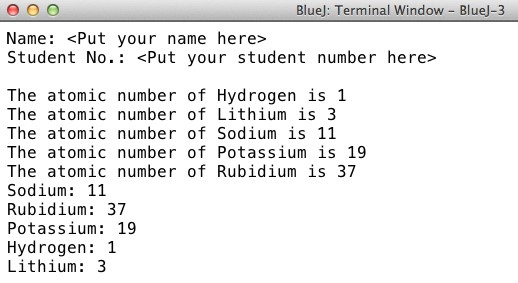
上图是 Q5 的 HashMap 输出(Fig. Q5),不是本题——题目要求本题自己截图。这里放它是为了提醒:HW4 所有选做题都要「截图 + 你的名字」,别只交代码。
对应课件:Ch11 p.88–97(ArrayList 的增删查、p.90 的 “Trade off: level of control vs. simplicity”);Ch8 p.41–43(Date 类与 getTime());Ch14 p.39–43(List 接口的四种实现:ArrayList/LinkedList/Vector/Stack)。
本题结论:四个数字里只有第三个量级不同。能解释「为什么只有 LinkedList + 下标慢」,这题就通了;只贴四个数字不解释,等于没做。
5.5 Q5(Optional)· MyHashMap
原文(EN)
| 原文 | 中文 |
|---|---|
| 5. (Optional) The following program stores the atomic number of 5 elements in a HashMap object (Self-learning: search the Internet to learn this class). Complete the code in the constructor and the method toString() so that the program can produce the output shown in Fig. Q5 when it is executed. Capture the output of your program. Your screen capture should contain your name. Note that HashMap does not guarantee the order of elements in the data structure. Therefore, your program output may be different from Fig. Q5. | 5.(选做)下面的程序把 5 种元素的原子序数存进一个 HashMap 对象(自学:上网了解这个类)。补全构造器与 toString() 中的代码,使程序运行后产生 Fig. Q5 所示的输出。截取程序输出,截图需包含你的姓名。注意 HashMap 不保证元素顺序,因此你的输出可能与 Fig. Q5 不同。 |
// MyHashMap.java  import java.util.*;
public class MyHashMap<K,V> extends HashMap<K,V> {
    public MyHashMap(K[] keys, V[] values) {
        super();
        // Store the <key,value> pairs to the HashMap object
        // Put your code here
    }

    public String toString() {
        // Put your code here
    }

    public static void main(String[] args) {
        String[] elements =
        {"Hydrogen","Lithium","Sodium","Potassium","Rubidium"};
        Integer[] atomicNumbers = {1,3,11,19,37};
        MyHashMap<String,Integer> map =
        new HyHashMap<String,Integer>(elements,atomicNumbers);
        for (int i=0; i<elements.length; i++) {
            System.out.println("The atomic number of " + elements[i] + " is "
            + map.get(elements[i]));
        }
        System.out.println(map.toString());
    }
}
原图
讲解
public MyHashMap(K[] keys, V[] values) {
    super();
    for (int i = 0; i < keys.length; i++) {
        put(keys[i], values[i]);        // 直接用继承来的 put()
    }
}

public String toString() {
    StringBuilder sb = new StringBuilder();
    for (K key : keySet()) {            // 或 entrySet()
        sb.append(key).append(": ").append(get(key)).append("\n");
    }
    return sb.toString();
}
三个要点:
put是从HashMap继承来的,不需要声明;这正是「继承 JDK 类」在本题的唯一用处——白拿一整套put/get/keySet。keySet()/entrySet()也是继承来的,toString()只需遍历它们拼字符串。用entrySet()更高效(一次拿到键和值,不用get再查一次)。- 顺序不可预期。题面已经明说 “HashMap does not guarantee the order of elements”,所以
toString()输出的五行顺序与你put的顺序无关。想固定顺序要用LinkedHashMap;想按 key 排序用TreeMap。
勘误:main() 里第 4 行写的是 new HyHashMap<String,Integer>(...)——多了一个 y,应为 MyHashMap。这是原文档的笔误,不改无法编译。(因为 main 不是「不许改」的部分,本题可以改这个类名笔误。)
对应课件:Ch11 p.47–49(Object 类与 toString:为什么必须覆盖它,否则打印 MyHashMap@1a2b3c);Ch11 p.78–87(泛型类 <K,V> 的声明方式,Box<T> 那一页就是本题的骨架)。
本题结论:这题考的不是 HashMap 的 API,而是「继承一个现成的类,只想改一件事(toString)时该覆盖什么」。代码量很小,但要能回答「为什么 put 不用自己写」。
5.6 Q6(Optional)· MyArrayList
原文(EN)
| 原文 | 中文 |
|---|---|
| 6. (Optional) Create a class called MyArrayList by inheriting java.util.ArrayList. Add a constructor that accepts either a String array or an Integer array as input. The constructor should be able to add all of the elements in the input array to the MyArrayList object. Add a method called print() to display the contents of the MyArrayList object. Create a class called TestMyArrayList to test the constructor and the print() method in MyArrayList. | 6.(选做)通过继承 java.util.ArrayList 创建 MyArrayList 类。添加一个构造器,接受 String 数组或 Integer 数组作为输入,该构造器应能把输入数组的所有元素加入 MyArrayList 对象。添加 print() 方法显示 MyArrayList 对象的内容。创建 TestMyArrayList 类测试构造器与 print() 方法。 |
| Hints: You may need to use “Generic Data Type” in Java. | 提示:你可能需要用到 Java 的「泛型数据类型」。 |
// TestMyArrayList.java
import java.util.Collections;
public class TestMyArrayList {
   public static void main(String args[]) {
      String[] subjects = {"EIE320", "EIE558", "EIE375", "EIE424"};
      Integer[] marks = {90,85,70,80};
      MyArrayList<String> sList
      = new MyArrayList<String>(subjects);
      Collections.sort(sList);
      sList.print();
      MyArrayList<Integer> mList = new MyArrayList<Integer>(marks);
      Collections.sort(mList);
      mList.print();
   }
}
原图
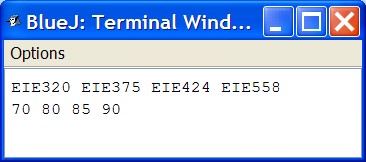
输出两行:EIE320 EIE375 EIE424 EIE558 与 70 80 85 90——都已被 Collections.sort 升序排列,且同一行以空格分隔。
讲解
「接受 String 数组或 Integer 数组」在 Java 里不能用一个泛型构造器优雅实现(数组与泛型不协变,E[] 在运行期擦除成 Object[],new MyArrayList<String>(subjects) 会把 String[] 传进来)。最直接、也是本题期望的答案是两个重载构造器:
import java.util.ArrayList;

public class MyArrayList<E> extends ArrayList<E> {

    public MyArrayList(String[] items) {
        super();
        for (String s : items) add((E) s);      // 见下方说明
    }

    public MyArrayList(Integer[] items) {
        super();
        for (Integer i : items) add((E) i);
    }

    public void print() {
        for (E item : this) {
            System.out.print(item + " ");
        }
        System.out.println();
    }
}
for (E item : this) 能跑,是因为 ArrayList 实现了 Iterable<E>——这是 ch14 的 interface 主题,见课件精读 ch14 p.39–43。
上面两处 (E) s / (E) i 是未检查转换(unchecked cast),编译会有黄色警告但能过。更干净的写法是让 MyArrayList 直接继承具体类型的列表,但那就丢了泛型。题目只要求「能跑出给定输出」,重载 + 转换是这条路径上最短的实现。
两个容易翻车的点:
Collections.sort(sList)要求元素实现Comparable。String与Integer都实现了,所以能排;如果你把MyArrayList用在自定义类上而该类没实现Comparable,会在运行期抛ClassCastException。排序结果印证了这一点:EIE320 < EIE375 < EIE424 < EIE558是字典序(注意EIE424排在EIE558前,因为第 4 位4 < 5),不是数值序。print()是一行一个列表、元素间空格、行末换行。若写成println(item)会变成一列,与图不符。
对应课件:Ch11 p.78–87(Java Generics、Generic Classes 声明、Box<T> 例);Ch11 p.88–97(ArrayList 的方法与泛型限制:ArrayList<int> 非法,必须用 ArrayList<Integer>——本题的 MyArrayList<Integer> 正是这条规则的实践);Ch14 p.39–43(List 接口 / ArrayList 实现)。
本题结论:这题真正的知识点是「泛型 + 继承 + 重载三件事同时出现时,谁约束谁」。答案不唯一,能解释「为什么必须两个构造器」就达标。
6. HW5 · OOP (Polymorphism)
6.0 HW5 结构
| 序 | 题目 | 必做 | 训练点 | 对应课件 |
|---|---|---|---|---|
| Q1a | searchByTitle(String) | ✅ | 遍历 + 精确匹配 + 返回父类型 | Ch11 p.50–59、p.58–59 |
| Q1c | searchByTitlePattern(String) | ✅ | 子串匹配、Pattern/Matcher | Ch9 p.26–30 |
| Q1d | searchByPattern(String) | ✅ | 「任意字段」→ 需要 toString 或 matches | Ch11 p.47–49 |
| Q2 | Auction.close() / getUnsold() | 遍历 + null 判断 + 组装新列表 | Ch11 p.88–97 |
勘误(题号):Q1 下面三个小问的标签依次是「(无编号)」「c.」「d.」——没有 a 和 b 的标签,直接跳到 c。按顺序它们是 a、c、d 三个方法,本文件沿用原文的 c/d 字样,但把它们当成第 1、2、3 个小问。
三问共用同一个骨架:
public Item searchByXxx(...) {
    for (Item item : items) {        // items 是 dome-v2 里那个 ArrayList<Item>
        if (满足条件) {
            return item;             // 返回的是 Item 类型
        }
    }
    return null;                      // 找不到
}
返回类型是 Item 而不是 CD/Video/VideoGame,这是整份作业的重点:一个方法、一种返回类型,却能返回三种不同的实际对象。调用方拿到的静态类型是 Item,运行时是真身——这就是多态。ch11 p.50 的定义原文是 “A variable of a supertype can refer to a subtype object.”
6.1 Q1a(Compulsory)· searchByTitle
原文(EN)
| 原文 | 中文 |
|---|---|
| (Compulsory) Use Polymorphism to write THREE new methods in the class Database. | (必做)用多态在 Database 类中写三个新方法。 |
| This question is extended from the project in Question 2, Homework 4. All class files can be found in “dome-v2” from Canvas. | 本题由 Homework 4 第 2 题的项目扩展而来,所有类文件都在 Canvas 的 dome-v2 中。 |
| Add a method with the following signature to the class Database. | 在 Database 类中添加如下签名的方法: |
| Item searchByTitle(String theTitle); | Item searchByTitle(String theTitle); |
| This method shall return a CD, Video or VideoGame object which title field matches the input parameter theTitle. For example, a call to db.searchByTitle(“Miss You Mix”).print() in “TestDatabase.java” will display the following: | 该方法应返回一个 CD、Video 或 VideoGame 对象,其 title 字段与参数 theTitle 匹配。例如在 TestDatabase.java 中调用 db.searchByTitle("Miss You Mix").print() 会显示: |
CD
Title: Miss You Mix
Got it: Yes
Playing time: 70
Comment: Best album
Artist: Leslie Cheung
No. of tracks: 12
讲解
public Item searchByTitle(String theTitle) {
    for (Item item : items) {
        if (item.getTitle().equals(theTitle)) {
            return item;
        }
    }
    return null;
}
三个判断:
- 用
equals不用==。getTitle()返回String;==比的是引用,两个内容相同的字符串字面量之外的场合会失配。这条规则在 Ch9 讲过(String Comparisons),也是作业里最常见的失分点。 getTitle()是Item里已有的 public 方法(dome-v2源码第 19–21 行),不需要自己加。如果Item没写这个 getter,就得先补一个——title是private,子类也读不到。return null不能省。 全部找完还没命中就返回null。调用方db.searchByTitle("...").print()在没命中时会抛NullPointerException——这是题目示例的写法带来的固有风险,正式代码里应判空。
对应课件
- Ch11 p.50–52(
Polymorphism+PolymorphismDemo):父类型变量指向子类型对象,displayObject(GeometricObject1)一个参数吃三种实参。 - Ch11 p.53–56(
Dynamic Binding):方法在运行期才决定调哪个实现。 - Ch11 p.58–59(
Generic Programming):参数类型写成父类,就能接收所有子类——本题的Item参数/返回类型同理。 - Ch9 p.15–16(
String Comparisons):为什么必须equals。
本题结论:判分点只有两个——返回类型是 Item、用 equals。方法体是五行模板,后面两问只换 if 里的条件。
6.2 Q1c(Compulsory)· searchByTitlePattern
原文(EN)
| 原文 | 中文 |
|---|---|
| c. Add a method with the following signature to the class Database. | c. 在 Database 类中添加如下签名的方法: |
| Item searchByTitlePattern(String pat); | Item searchByTitlePattern(String pat); |
| This method shall return a CD, Video or VideoGame object which title field contains the input parameter pat. For example, a call to db.searchByTitlePattern(“Star”).print() in “TestDatabase.java” will display the following: | 该方法应返回一个 CD、Video 或 VideoGame 对象,其 title 字段包含参数 pat。例如调用 db.searchByTitlePattern("Star").print() 会显示: |
Video
Title: Star Trek
Got it: Yes Playing time: 127 Comment:
Director: J. J. Abrams
讲解
public Item searchByTitlePattern(String pat) {
    Pattern p = Pattern.compile(pat);
    for (Item item : items) {
        Matcher m = p.matcher(item.getTitle());
        if (m.find()) {          // find() = 任意位置出现;matches() = 整串完全匹配
            return item;
        }
    }
    return null;
}
find() 与 matches() 必须分清:
| 方法 | 语义 | 本题该用哪个 |
|---|---|---|
m.matches() | 整个字符串必须完全匹配模式 | ❌ "Star" 不会匹配 "Star Trek" |
m.find() | 字符串中任意位置出现即可 | ✅ 返回 Star Trek |
题面说 “contains the input parameter pat”,就是 find() 的语义。用 matches() 会漏掉 Star Trek,是最典型的错法。
正则的坑:Pattern.compile(pat) 会把 pat 当正则表达式解释。如果实参里含 .、*、(、[ 等元字符(例如搜索标题 “Vol.1”),行为就不是子串匹配了。要按字面量匹配,应写 Pattern.compile(Pattern.quote(pat)),或干脆用 item.getTitle().contains(pat):
if (item.getTitle().contains(pat)) { return item; } // 纯子串,无需 Pattern题目提示 “You may need to use the Pattern and Matcher classes”,所以两种写法都算对;但用 contains 更安全,用 Pattern 更贴合题面。我的建议是:写 Pattern 版本交上去(对上题目期待),心里知道 contains 才是完全等价的安全版。
原图说明:题面给的样例输出里 Got it: Yes Playing time: 127 Comment: 挤在同一行、Comment: 后面是空的——这是原文档排版时丢了换行与空字符串,不代表你的 print() 要那样输出。按 HW4 Q2 的 print() 正常输出即可(Comment: 后为空,因为 Star Trek 没设注释)。
对应课件
- Ch9 p.26–30(
Matching, Replacing and Splitting):Pattern、Matcher、find()、matches()、replaceAll()、split()的原文与示例——逐页版见 eie3320 ch09 walkthrough,概念小结见 EIE3320 Week 4。 - Ch9 p.25(
Example):"Java".split(...)之类的切分例子。 - Ch11 p.58–59(
Generic Programming):遍历所有Item而不区分具体子类。
本题结论:find() 而非 matches();Pattern 的元字符要么 quote 要么改用 contains。这两句话就是本题的全部。
6.3 Q1d(Compulsory)· searchByPattern(任意字段)
原文(EN)
| 原文 | 中文 |
|---|---|
| d. Add a method with the following signature to the class Database. | d. 在 Database 类中添加如下签名的方法: |
| Item searchByPattern(String pat); | Item searchByPattern(String pat); |
| This method shall return either a CD, Video or VideoGame object if any of its field contains the input parameter pat. For example, a call to db.searchByPattern(“Joey”).print() in “TestDatabase.java” will display the following: | 如果某个 CD、Video 或 VideoGame 对象的任意字段包含参数 pat,则返回该对象。例如调用 db.searchByPattern("Joey").print() 会显示: |
| Hints: You may need to use the Pattern and Matcher classes in Java. | 提示:你可能需要用到 Java 的 Pattern 与 Matcher 类。 |
CD
Title: Joey & Joey
Got it: Yes
Playing time: 60
Comment: My favorite album
Artist: Joey Yung
No. of tracks: 11
讲解
这一问的难点不是正则,而是「任意字段」——Item 的四个字段(title/playingTime/gotIt/comment)全是 private,Database 根本读不到;子类的 artist/director/platform 更读不到。所以必须先给「对象自己」一个能力,让它把自己的全部内容说成一个字符串。
这正是 toString() 的用途。 dome-v2 的 Item 没有覆盖 toString(),所以直接 item.toString() 会得到 Item@1b6d3586(ch11 p.48 讲的默认实现)。因此最小改动是:
// 在 Item 中新增
public String toString() {
    return "Title: " + title + " Got it: " + gotIt
         + " Playing time: " + playingTime + " Comment: " + comment;
}

// CD 中覆盖,补上自己的字段
public String toString() {
    return super.toString() + " Artist: " + artist
         + " No. of tracks: " + numberOfTracks;
}

// Video / VideoGame 同理加上 director / platform / numberOfPlayers
然后在 Database 里:
public Item searchByPattern(String pat) {
    Pattern p = Pattern.compile(pat);
    for (Item item : items) {
        if (p.matcher(item.toString()).find()) {   // ← 多态:调到各子类的 toString
            return item;
        }
    }
    return null;
}
item.toString() 在运行时调的是实际类型的 toString(),所以 CD 的 Artist 也会被匹配到——searchByPattern("Joey") 能命中 Joey & Joey,正是因为 Joey Yung 这个 artist 值出现在 CD.toString() 里。
更「面向对象」的替代写法(不给 Database 开后窗,让对象自己判断):
// Item
public boolean matches(String pat) {
    Pattern p = Pattern.compile(pat);
    return p.matcher(toString()).find();
}
// Database
if (item.matches(pat)) return item;两种都能过。区别在于第二种把「怎么判断自己是否匹配」封装在对象内部,Database 不需要知道 Item 有哪些字段——这更符合 ch8/ch10 讲的封装(encapsulation)。作业判分不区分,但理解了这层差别的,考试答概念题会更稳。
对应课件
- Ch11 p.47–49(
The Object Class and Its Methods、The toString method in Object):默认toString返回类名@哈希,所以要覆盖;getClass().getName() + '@' + Integer.toHexString(hashCode())是默认实现原文。 - Ch11 p.42–43(
Overriding Methods in the Superclass):super.toString() + "\nradius is " + radius就是「先父后子」的范式。 - Ch9 p.26–30(
Pattern/Matcher)。 - Ch10 p.15–23(类抽象与封装):为什么
matches()比Database直接读字段更好。
本题结论:这一问的考点是「父类看不见子类字段时怎么办」——答案是让对象自己把内容吐出来(toString)或自己判断(matches)。这也解释了为什么 ch11 要专门用两页讲 toString。
6.4 Q2(Optional)· Auction.close() 与 getUnsold()
原文(EN)
| 原文 | 中文 |
|---|---|
| 2. (Optional) Write two methods close() and getUnsold() to the Auction class. | 2.(选做)为 Auction 类写 close() 与 getUnsold() 两个方法。 |
| Open the project “auction” and read the code in the four classes: Auction, Bid, Lot, and Person. | 打开 auction 项目,阅读 Auction、Bid、Lot、Person 四个类的代码。 |
| Add a close method to the Auction class. This should iterate over the collection of Lot objects and print out details of all the lots. For lots that have been sold, the details should include the name of the successful bidder, and the value of the winning bid. For lots that have not been sold, print a message that indicates this fact. | 为 Auction 类添加 close 方法。它应遍历 Lot 对象集合,打印所有拍品的详情。已成交的拍品,详情要包含中标者姓名与成交价;未成交的拍品,打印一条说明该事实的信息。 |
| Add a getUnsold method to the Auction class with the following signature: | 为 Auction 类添加如下签名的 getUnsold 方法: |
| public ArrayList getUnsold(); | public ArrayList getUnsold(); |
| This method should iterate over the lots field, storing unsold lots in a new ArrayList local variable. At the end of the method, return the list of unsold lots. | 该方法应遍历 lots 字段,把未成交的拍品存进一个新的 ArrayList 局部变量,方法结束时返回该列表。 |
public class TestMyAuction {
  public static void main(String [] args) {
    Person p1 = new Person("Peter");
    Person p2 = new Person("Tom");
    Auction auction = new Auction();
    auction.enterLot("Camera");
    auction.enterLot("Phone");
    auction.enterLot("TV");
    auction.enterLot("DVD");
    auction.showLots();

    Lot lot1 = auction.getLot(1);
    lot1.bidFor(p1,100);
    auction.showLots();

    Lot lot2 = auction.getLot(2);
    lot2.bidFor(p2,200);
    auction.showLots();
    lot2.bidFor(p1,300);
    auction.showLots();
    auction.close();

    ArrayList unsoldLots = auction.getUnsold();
    Iterator it = unsoldLots.iterator();
    while (it.hasNext()) {
        Lot unsoldLot = (Lot) it.next();
        System.out.println("Unsold lot: " + unsoldLot.getNumber()+
            " " + unsoldLot.getDescription());
    }
  }
}
讲解
先确认四个类的可用接口(来自 BlueJProjects/Projects/chapter04/auction):
| 类 | 关键成员 |
|---|---|
Auction | private ArrayList<Lot> lots、enterLot(String)、showLots()、getLot(int) |
Lot | getNumber()、getDescription()、getHighestBid()(无出价时返回 null)、bidFor(Person, long) |
Bid | getBidder(): Person、getValue(): long |
Person | getName(): String |
getHighestBid() 返回 null 就是「未成交」的判据——出价记录存在即成交,不存在即流拍。不需要额外的 sold 字段。
public void close() {
    for (Lot lot : lots) {
        System.out.println(lot.getNumber() + ": " + lot.getDescription());
        Bid bid = lot.getHighestBid();
        if (bid != null) {
            System.out.println("    Sold to " + bid.getBidder().getName()
                    + " for " + bid.getValue());
        } else {
            System.out.println("    (No bid)");
        }
    }
}

public ArrayList getUnsold() {
    ArrayList unsold = new ArrayList();      // 签名要求返回裸 ArrayList
    for (Lot lot : lots) {
        if (lot.getHighestBid() == null) {
            unsold.add(lot);
        }
    }
    return unsold;
}
跑 TestMyAuction 的预期结果:
| 拍品 | 编号 | 出价过程 | close() 应打印 | 是否在 getUnsold() |
|---|---|---|---|---|
| Camera | 1 | Peter 100 | Sold to Peter for 100 | ❌ |
| Phone | 2 | Tom 200 → Peter 300 | Sold to Peter for 300 | ❌ |
| TV | 3 | 无 | (No bid) | ✅ |
| DVD | 4 | 无 | (No bid) | ✅ |
最后 getUnsold() 的循环会打印 Unsold lot: 3 TV 与 Unsold lot: 4 DVD。
两个细节:
bidFor的语义是「只有更高的出价才被接受」(Lot.bidFor里highestBid.getValue() < value才更新)。所以Phone最后的中标者是 Peter 的 300,不是 Tom 的 200。如果按「最后一次出价」理解就会写错。close()的输出格式自由。题目只要求「包含中标者姓名与成交价」「未成交要说明」,没有给样例文本。上面用了Sold to ... for ...与(No bid),与showLots()里(No bid)的措辞一致,便于对照。
对应课件
- Ch11 p.88–97(
ArrayList的遍历与add):getUnsold就是「过滤出满足条件的元素,装进新列表」。 - Ch11 p.91–93(
findIndex的字符串版与 int 版对比):同一个「遍历 + 条件判断」骨架。 - Ch14 p.39–43(
List接口与ArrayList):为什么签名写成public ArrayList getUnsold()而不是List<Lot>(旧代码沿用了 Java 1.4 风格)。
本题结论:getHighestBid() == null 是「流拍」的唯一判据;close() 是「遍历 + 分类打印」,getUnsold() 是「遍历 + 过滤 + 装新列表」。这两个模式在 Test 里出现频率极高,值得背。
7. 五份作业之后:三条主线
把五份作业横着看,EIE3320 前半学期其实只教了三件事,每一件都在作业里出现两次以上。
主线一:数据建模——「一个对象该有哪些字段」
| 出现处 | 形态 | 学到的判断 |
|---|---|---|
HW2 Q2 Rectangle | 2 个字段 + 2 个计算型 getter | 字段存状态,方法算派生值(面积不存,算出来) |
HW3 Q1 Course | 2 个字段 + toString | 对象要能「说出自己」 |
| HW4 Q1 → Q2 | 6 个字段写在 3 个类里 → 收进 Item | 共同字段上移,差异字段留下 |
| HW5 Q1d | Item 的字段全 private | 封装之后,外部只能通过对象自己给的方法拿信息 |
这条线的终点是 ch10 的「类抽象与封装」:字段私有、行为公开、派生值不存。
主线二:容器与遍历——「怎么把对象攒起来再走一遍」
| 出现处 | 容器 | 遍历方式 |
|---|---|---|
| HW1 Q3 | 无(直接算) | for + %10 换行 |
| HW3 Q1 | Course[] + courseNumber | 下标,上限用条数不用长度 |
| HW4 Q1 | 三个 ArrayList | 裸 Iterator + 强转 |
| HW4 Q2 | 一个 ArrayList<Item> | Iterator + 向下转型 |
| HW4 Q3/Q4 | 同上 | 下标 / size() 提前取 / Iterator / for-each |
| HW5 Q2 | ArrayList<Lot> + 新建 ArrayList | for-each + 过滤 |
四个必须记牢的结论:
- 数组的
length是容量,不是条数(HW3)。 ArrayList<T>的get()不用强转,裸Iterator的next()要强转(HW3 Q5)。LinkedList+ 下标 =O(n²),Iterator在两种实现上都是O(n)(HW4 Q4)。- 遍历中要删除元素,只能用
Iterator.remove(),不能边下标遍历边ArrayList.remove()。
主线三:多态——「一个签名,三种行为」
| 阶段 | 代码 | 关键动作 |
|---|---|---|
| HW4 Q1 | cd.print(); video.print(); videoGame.print(); | 三段重复,写三遍 |
| HW4 Q2 | for (Item item : items) item.print(); | 一行搞定,靠覆盖 |
| HW5 Q1 | Item searchByTitle(...) 返回 Item | 一个返回类型,三种实际对象 |
| HW5 Q1d | item.toString() 调到子类版本 | 动态绑定的具体证据 |
三个术语的对应关系(考试必考):
| 术语 | 一句话 | 在作业里的位置 |
|---|---|---|
| 覆盖 overriding | 子类重写父类同名同参方法 | HW4 Q2 的 print() |
| 重载 overloading | 同类中同名不同参 | HW1 Q3 若写两个 getTriangularNumber |
| 动态绑定 dynamic binding | 运行期按实际类型决定调哪个实现 | HW4 Q2 的 item.print()、HW5 Q1d 的 item.toString() |
ch11 p.46 那两段几乎一样的代码(一个用 double p(double) 覆盖、一个用 p(int) 重载)就是这三者的分水岭,值得单独再看一遍——见 eie3320 课件精读 的 ch11 p.46 一节。
8. 勘误与待确认
逐条列出核对作业原文时发现的不一致,按「会不会影响判分」排序。
| # | 位置 | 原文 | 应为 / 说明 | 影响 |
|---|---|---|---|---|
| 1 | HW4 Q5 main() | new HyHashMap<String,Integer>(...) | new MyHashMap<String,Integer>(...) | 不改无法编译 |
| 2 | HW3 Q1 测试类名 | Test1Q2A | 与 HW3 Q1 编号不符,疑为旧版类名;不要改(文件名须与类名一致) | 无 |
| 3 | HW5 Q1 小问标签 | 无编号 → c. → d. | 缺 a./b. 标签;按顺序是第 1、2、3 问 | 无 |
| 4 | HW4 题号 | Q1、Q2、(无号)、(无号)、5.、6. | 中间两题未打印题号,实际是 6 题 | 无 |
| 5 | HW2 Q1b | ”after adding one second” | timeTick() 是加一分钟(源码注释 //add one minute,6 组对照也全是分钟级) | 无(按分钟理解) |
| 6 | HW1 Q3 | 1+2+3+ + n | 省略号在文本提取中丢失,应为 1+2+3+…+n | 无 |
| 7 | HW5 Q1c 样例输出 | Got it: Yes Playing time: 127 Comment: 挤在一行 | 排版丢换行,非输出格式要求 | 无 |
| 8 | HW1 Q1 样例 | 输出多一行 Hello: Chan Tai Man | 样例程序自加的问候,题目正文未要求 | 无 |
| 9 | HW2 Q1b 输出格式 | 1:03 a.m. (or 01:03 a.m.) | 两种都接受,不要同时用两种 | 无 |
| 10 | HW4 Q2 | Item 是具体类 | 到 ch14 应改为 abstract class Item;本题不必改 | 无 |
另有两条「题目没明说但会影响自查」的默认约定:
- 所有输出题(HW1 Q1、HW3 Q1、HW4 Q1/Q2)都以课件给的样例输出为准,包括空格与换行;不要用
printf("%.2f")之类「美化」输出。 - 所有选做题要求「截图 + 你的名字」(HW4 Q4/Q5 明写,其余按惯例),只交代码可能不给分。
链接
配套精读
- eie3320 课件精读(ch11 / ch14) — 本文 HW4/HW5 的课件页码全部指向这里
- eie3320 考前练手项目 — 把 HW1–5 的重难点串成一条 7 阶段流水线,每阶段带逐字验收输出
- eie3320 ch09 walkthrough — HW5 正则部分(
Pattern/Matcher)的逐页精读
课堂笔记
- EIE3320 Week 1 — Ch1 编译与 Java 程序结构;Ch2–7 输入、语法、选择、循环、方法、数组、
ArrayList(HW1 全部、HW2 Q3/Q5 的依据) - EIE3320 Week 2 — Ch8 对象与类、构造器、
static、可见性、传对象(HW2 全部、HW3 Q1 的依据) - EIE3320 Week 3 — Ch10 不可变对象、作用域、
this、抽象与封装、类设计准则(HW3 的「为什么这样设计」) - EIE3320 Week 4 — Ch9 字符串、
Character、StringBuilder、命令行参数、文件 I/O、异常(HW1 Q5 的args、HW5 Q1 的正则)
原始素材
| 文件 | 用途 |
|---|---|
EIE3320 HW 1 Java Programming Basic.docx | HW1 原文与样例输出图 |
EIE3320 HW 2 OO Programming (Object Interaction).docx | HW2 原文、MyClock、附录操作图解 |
EIE3320 HW 3 OO Programming (Grouping Objects)_v3-1.docx | HW3 原文(另有同名 PDF 旧版) |
EIE3320 HW 4 OO Programming (Inheritance)-1.docx | HW4 原文与类图 |
EIE3320 HW 5 OO Programming (Polymorphism).docx | HW5 原文 |
BlueJProjects.zip | chapter03/clock-display(HW2)、chapter04/auction(HW3 Q5、HW5 Q2)、chapter04/notebook2(HW4 Q3) |
dome-v1.zip / dome-v2_file-162577.zip | HW4 Q1 / Q2 的起始工程,含 Item、Database、TestDatabase 真实源码 |
EIE3320_schedule_20260904.pdf | 各次作业周次 |
EIE3320 ch 11 Inheritance and Polymorphism_student_ver.pdf | ch11 课件(98 页) |
EIE3320 ch 14 Abstract Classes and Interfaces.pdf | ch14 课件(44 页) |